Building a Security Compliance Lab from Scratch: Part 3: Mapping to NIST CSF 2.0
NIST CSF 2.0 shows up on more job descriptions than almost any other framework right now. Not because companies are all formally certified against it, but because it gives security teams a common language for talking about risk. If you can map real work to its six functions, you’re speaking that language.
Part 1 and Part 2 of this series built the lab and demonstrated ISO 27001 Annex A controls. Part 3 takes the same environment and maps it to NIST CSF 2.0, covering all six functions: GOVERN, IDENTIFY, PROTECT, DETECT, RESPOND, and RECOVER. The difference from Part 2 is that this time the evidence includes live attack simulation with automated response, a remediated compliance scan, and snapshot-based recovery.
The lab is still the same five-VM environment on Citadel. pfSense segmenting four zones, Wazuh collecting logs from four agents, dc01 running Active Directory, linux-endpoint as the OpenSCAP compliance target, and kali-attack as the threat simulation machine. If you’re jumping in here, Part 1 covers the infrastructure and Part 2 covers the ISO 27001 work.
Here’s how each NIST CSF 2.0 function maps to the lab:
| Function | Lab Activity | Tool |
|---|---|---|
| GOVERN | Asset inventory, security policies, risk scope | AD domain structure + pfSense zone design |
| IDENTIFY | Vulnerability scan, asset visibility, SIEM coverage | OpenSCAP + Wazuh agents |
| PROTECT | GPO hardening, network segmentation, remediation | AD Group Policy + pfSense + OpenSCAP fixes |
| DETECT | Real-time brute force detection, 1,012 alerts | Wazuh + Hydra |
| RESPOND | Automated IP block on attack detection | Wazuh active response |
| RECOVER | VM snapshots before every major change | Proxmox snapshots |
GOVERN: Defining the Scope
GOVERN is the newest function in CSF 2.0. It wasn’t in the original framework and it’s the one most people skip in homelab writeups because it feels like paperwork. But it’s actually the function that ties everything else together. It asks: what are you protecting, who’s responsible, and what’s the acceptable risk?
For this lab the answers are documented in the network design itself. The pfSense zone layout defines the trust boundaries. MGMT is the most trusted zone, CORPNET holds the production assets, and the ATTACK zone is explicitly isolated. That segmentation is a governance decision, not just a technical one. It says: these systems are sensitive, these aren’t, and nothing crosses zones without a rule that explicitly allows it.
The Active Directory structure reinforces this. The slytech.us domain has separate OUs for Engineering, HR, IT-Admins, Production, and Sales. Access control policies applied at the domain level through Group Policy reflect the same logic: not everyone gets the same access, and the rules are enforced at the infrastructure layer, not just documented in a policy doc.
IDENTIFY: Knowing What You Have
You can’t protect what you can’t see. IDENTIFY covers asset management, vulnerability assessment, and understanding your risk posture.
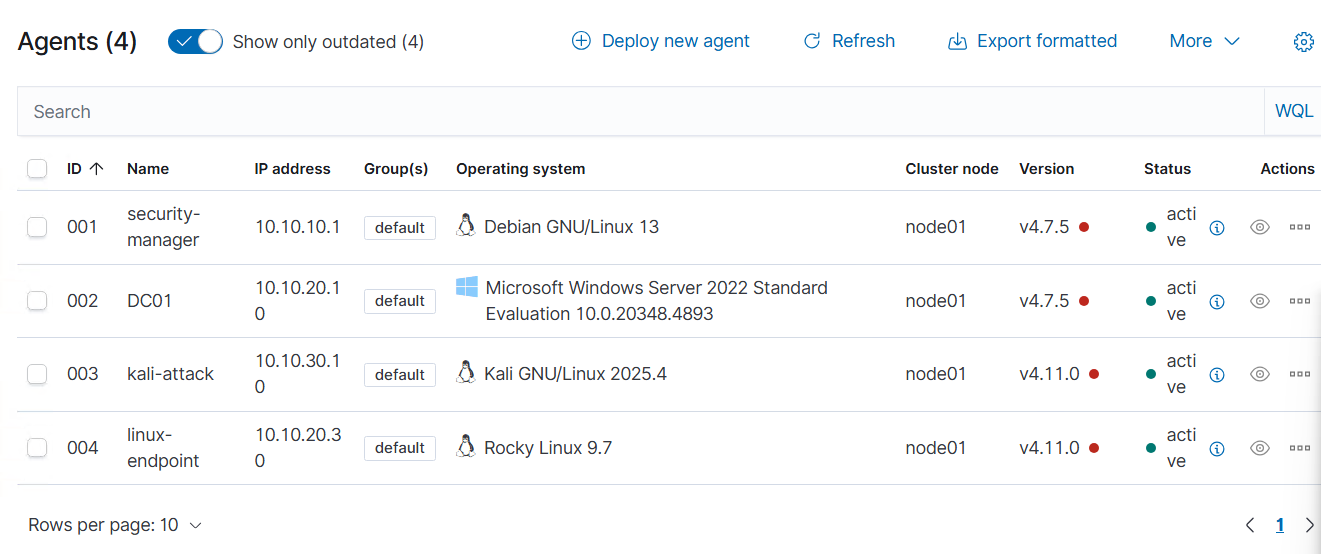
Wazuh gives asset visibility across all four endpoints. The agents report system inventory automatically: OS version, installed packages, running services, open ports. Every machine in the lab shows up in the dashboard with its current state.
The OpenSCAP scan on linux-endpoint is the vulnerability assessment piece. Before any hardening, a fresh Rocky Linux 9 minimal install scored 69.07% against the CIS Level 2 benchmark. 187 rules failed. That scan result is the IDENTIFY artifact: a documented list of gaps before remediation starts.
PROTECT: Hardening the Environment
PROTECT is where the control implementation lives. Three things happened in this lab that demonstrate it directly.
Group Policy enforcement on the domain. The CIS-Baseline-Policy GPO sets 14-character minimum password length, complexity requirements, 5-attempt account lockout, and 15-minute lockout duration across the entire slytech.us domain. Every domain-joined machine inherits these settings automatically. No per-machine configuration, no relying on defaults.
Network segmentation enforcing least-privilege access. pfSense enforces four separate zones with explicit rules between them. CORPNET can’t reach the ATTACK zone. The ATTACK zone can’t reach MGMT. Traffic between zones requires an explicit allow rule. That one-way restriction is what made the brute force test in DETECT meaningful. The attacker’s path was constrained from the start.
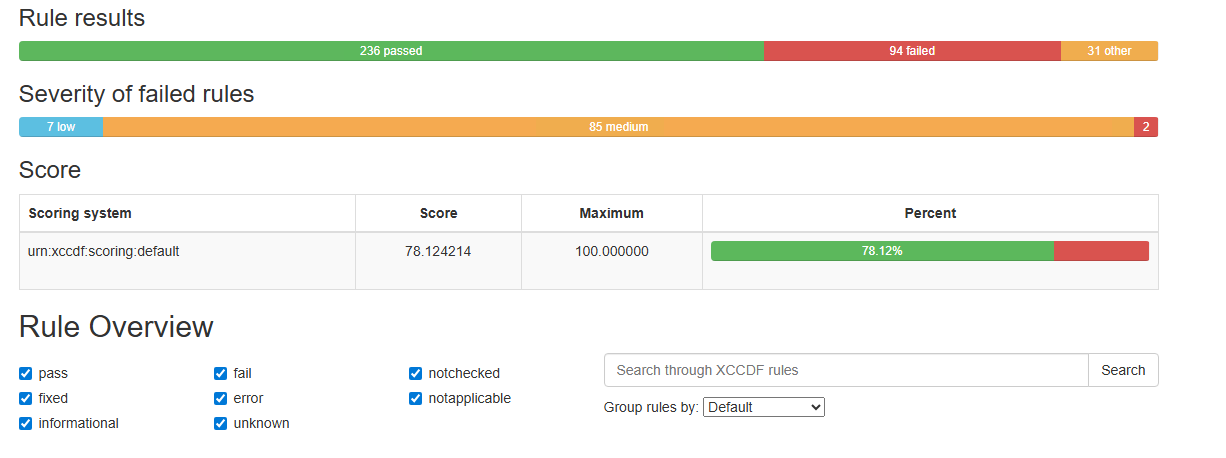
OpenSCAP remediation moving the score from 69% to 78%. After the baseline scan in Part 2, I went back and applied targeted remediations on linux-endpoint:
# Enable and configure auditd
sudo systemctl enable auditd --now

# SSH hardening
sudo sed -i 's/^#PermitRootLogin.*/PermitRootLogin no/' /etc/ssh/sshd_config
sudo sed -i 's/^#ClientAliveInterval.*/ClientAliveInterval 300/' /etc/ssh/sshd_config
sudo sed -i 's/^#ClientAliveCountMax.*/ClientAliveCountMax 0/' /etc/ssh/sshd_config

# sysctl network hardening
sudo bash -c 'cat >> /etc/sysctl.d/99-cis.conf << EOF
net.ipv4.conf.all.accept_redirects = 0
net.ipv4.conf.all.log_martians = 1
net.ipv4.conf.all.rp_filter = 1
net.ipv6.conf.all.accept_ra = 0
net.ipv6.conf.all.forwarding = 0
EOF'

# PAM faillock configuration
sudo authselect select sssd with-faillock --force
sudo bash -c 'cat > /etc/security/faillock.conf << EOF
deny = 5
unlock_time = 900
audit
silent
EOF'

# Password quality
sudo bash -c 'cat > /etc/security/pwquality.conf << EOF
minlen = 14
minclass = 4
maxrepeat = 3
difok = 8
dictcheck = 1
EOF'
The remaining failures after remediation are architectural. Separate partitions for /var, /tmp, /home, and /var/log need to be set at install time. You can’t add them to a running system. That’s documented as a build-time requirement for any future deployments.
Post-remediation score: 78.12%.
DETECT: Catching the Attack in Real Time
Detection controls are only worth anything if they actually fire. The test for DETECT is simple: run an attack and see if Wazuh catches it.
From kali-attack on the ATTACK zone (10.10.30.10), I ran Hydra against the SSH service on linux-endpoint (10.10.20.30) in CORPNET:
hydra -l sly -P /usr/share/wordlists/rockyou.txt -t 4 -V -I ssh://10.10.20.30
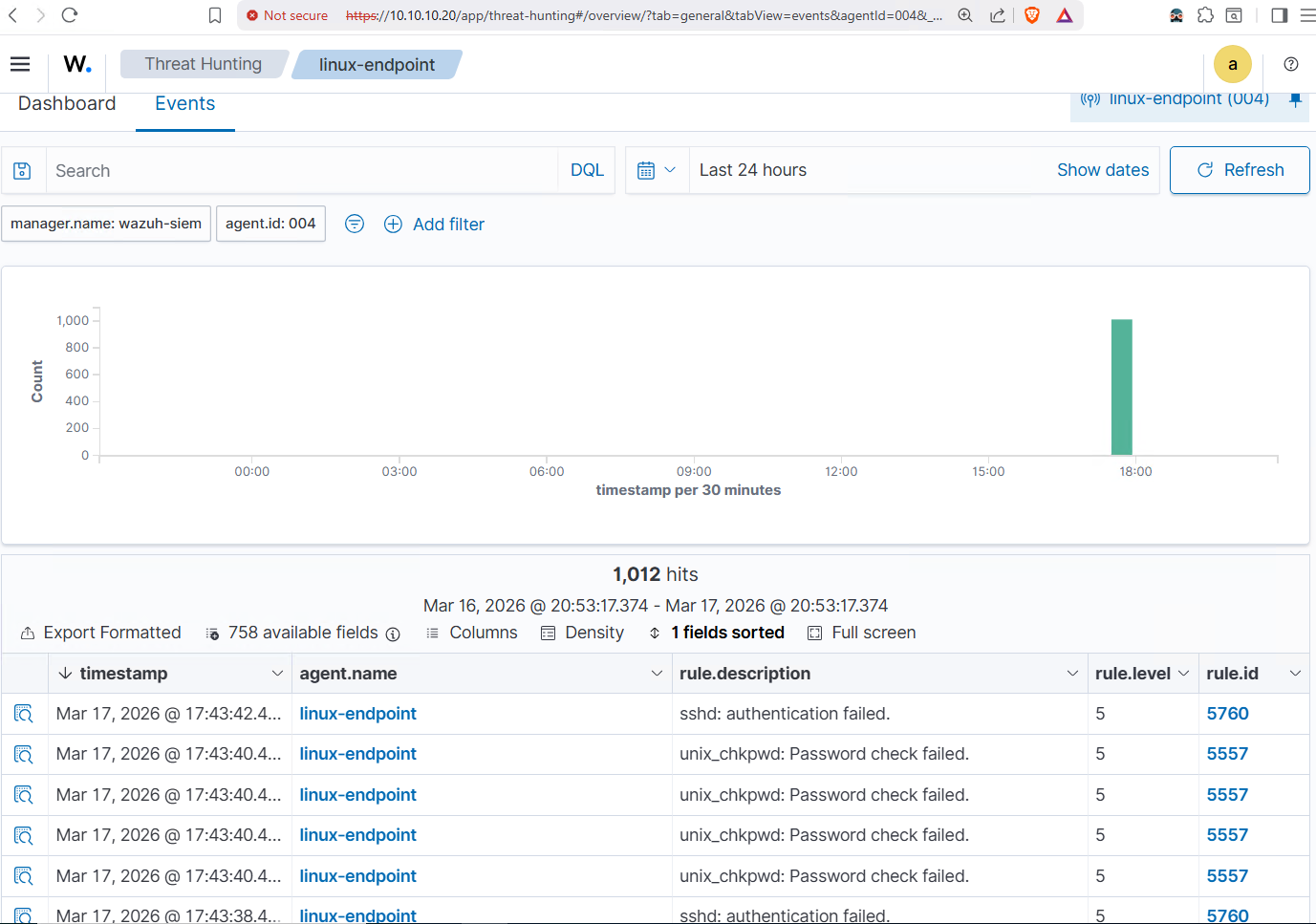
Wazuh caught it immediately. 1,012 events in the first few minutes. Rule 5760 (sshd: authentication failed) and rule 5557 (unix_chkpwd: password check failed) firing continuously. The spike is visible in the timeline the moment Hydra started.
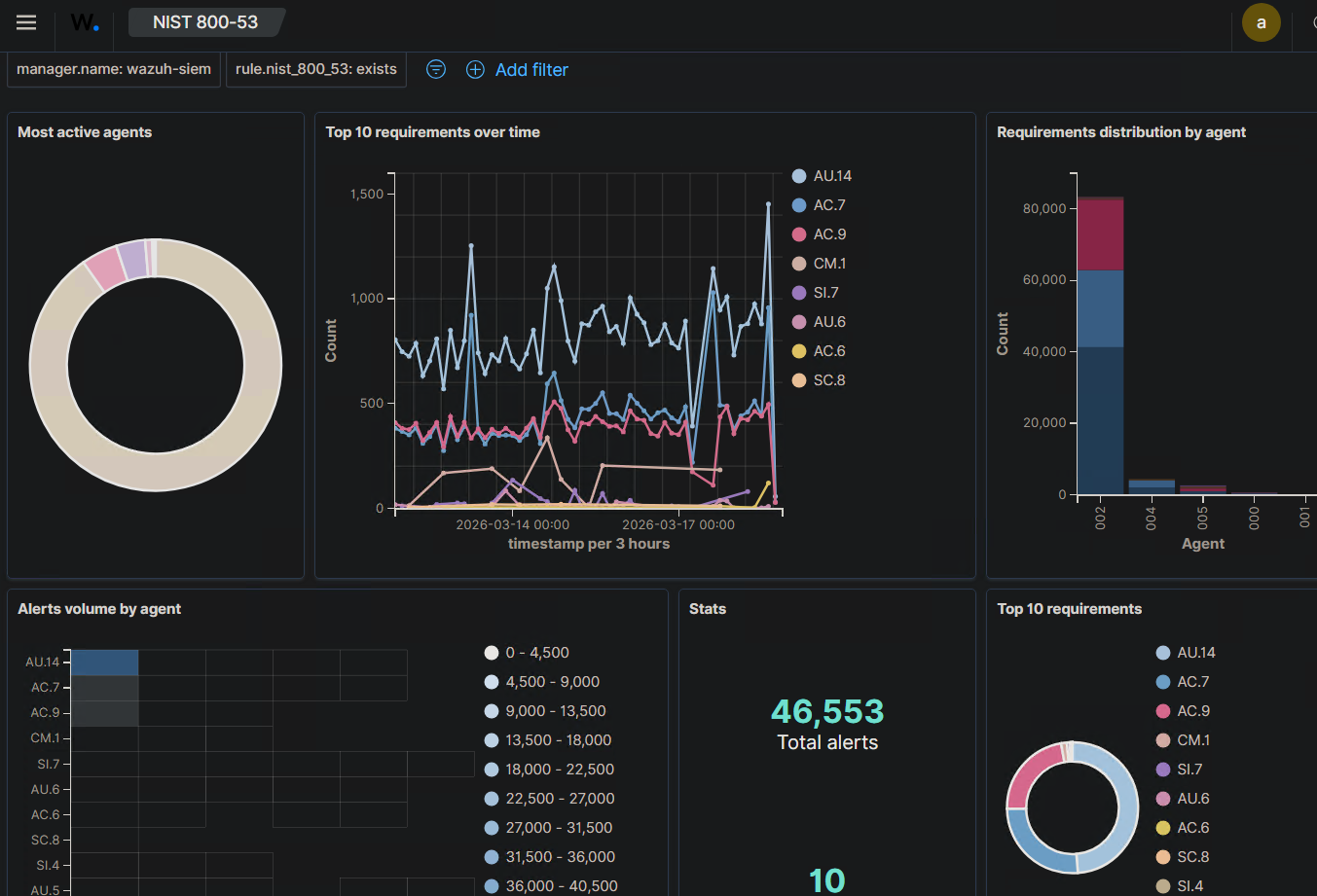
The NIST 800-53 compliance dashboard shows the broader picture. 46,553 total alerts mapped to specific control families across all agents. AU.14 (audit log content) and AC.7 (unsuccessful login attempts) are the top requirements, which makes sense given all the authentication activity from dc01 and the brute force against linux-endpoint. The spike on March 17 is the Hydra run, clearly attributed to linux-endpoint in the agent breakdown.
RESPOND: Automated Response to the Threat
Detecting an attack is one thing. Responding to it automatically is another. RESPOND in NIST CSF 2.0 requires that the organization takes action when a security event is detected.
Wazuh has a built-in active response module that can execute commands on endpoints when specific rules fire. I configured it to automatically block any IP that triggers rule 5760 for 300 seconds:
<command>
  <name>firewall-drop</name>
  <executable>firewall-drop</executable>
  <timeout_allowed>yes</timeout_allowed>
</command>

<active-response>
  <command>firewall-drop</command>
  <location>local</location>
  <rules_id>5760</rules_id>
  <timeout>300</timeout>
</active-response>
When the brute force started, Wazuh detected the threshold breach and automatically dropped Kali’s IP at the firewall level on linux-endpoint. The active-responses.log confirms the block:
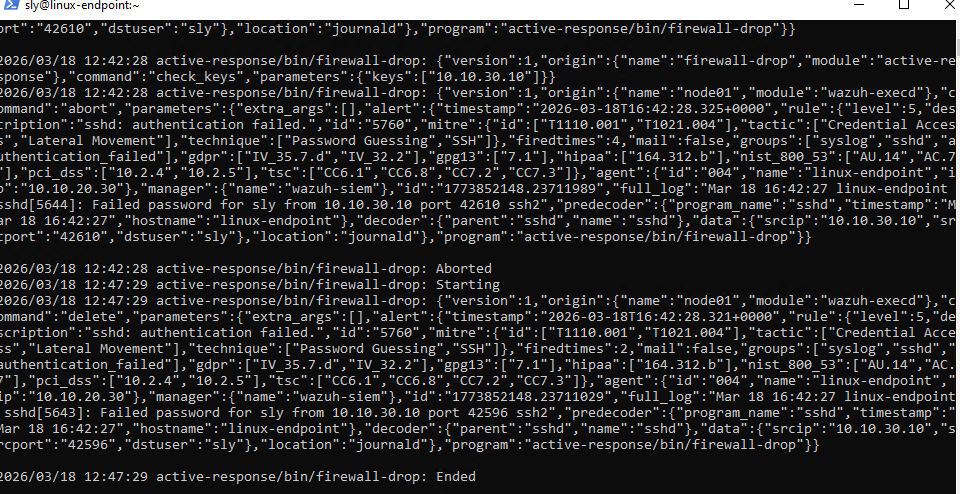
Hydra’s output tells the same story from the attacker’s side. After 20 attempts, all children were disabled due to connection errors. The attack stopped because the response fired.
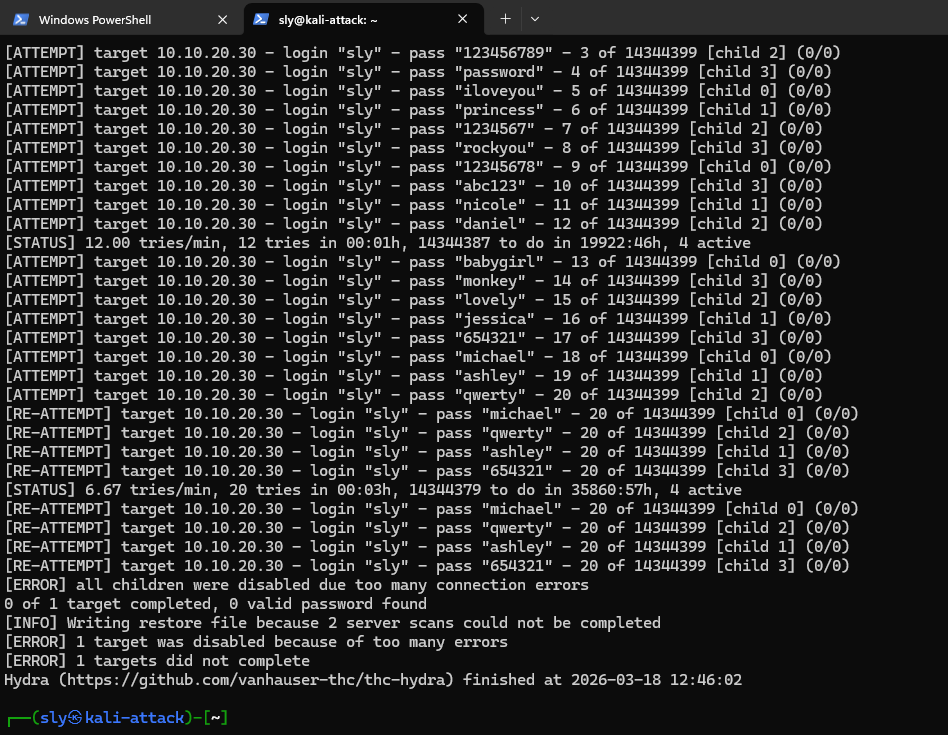
No manual intervention. No analyst needing to notice the alert and act on it. The detection fed directly into the response, and the attack failed.
RECOVER: Snapshot-Based Recovery Baseline
RECOVER asks: if something breaks, can you restore it? For this lab, the answer is Proxmox snapshots. Before every major change, I snapshot the affected VMs. Before the Part 3 remediation work started, VM 216 (linux-endpoint) was snapshotted at its Part 2 state.
qm snapshot 216 pre-part3-remediation --vmstate 0
That snapshot is the recovery baseline. If the remediations had broken something, rolling back to a known-good state is a single command:
qm rollback 216 pre-part3-remediation
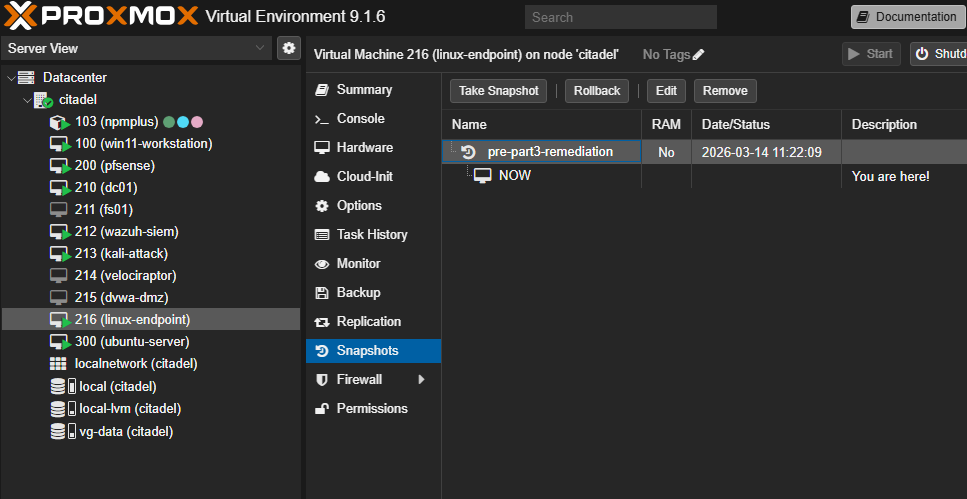
This is a lightweight recovery strategy, not enterprise backup infrastructure. It covers point-in-time recovery for individual VMs before planned changes. For a production environment, this would be paired with a Proxmox Backup Server running scheduled backups to a separate storage target. The snapshot approach demonstrates the principle: document a known-good state, verify the restore path works, and have a plan before you touch anything.
What the Evidence Shows
Six functions, six pieces of evidence:
| Function | Evidence | Tool |
|---|---|---|
| GOVERN | Zone-based network design + AD domain structure with OUs | pfSense + Active Directory |
| IDENTIFY | Wazuh agent inventory across 4 endpoints + OpenSCAP baseline 69.07% | Wazuh + OpenSCAP |
| PROTECT | GPO enforcement + pfSense segmentation + remediation to 78.12% | AD Group Policy + pfSense + OpenSCAP |
| DETECT | 1,012 Wazuh alerts from live brute force, NIST 800-53 dashboard 46,553 total | Wazuh + Hydra |
| RESPOND | Wazuh active response auto-blocking Kali’s IP, Hydra stopped cold | Wazuh active response |
| RECOVER | Proxmox snapshots before every change, documented rollback path | Proxmox |
All of it runs on a single Proxmox node with 32GB RAM. The tools are Wazuh, OpenSCAP, pfSense, and Active Directory. Every one of them shows up in real SOC environments.
What’s Next
Three parts, two frameworks, one lab. The series is done. Next up: Proxmox Backup Server (PBS) to give RECOVER a stronger backup story, and Wazuh custom detection rules for writing your own SIEM alerts from scratch.