Building a Security Compliance Lab from Scratch: Part 2: Demonstrating ISO 27001 Annex A Controls
Security frameworks look great on a resume. They look better when you can show the evidence.
Part 1 built the infrastructure: pfSense segmenting four network zones, Wazuh collecting logs from four agents, dc01 running Active Directory, and a fresh Rocky Linux 9 VM sitting in the Corporate zone waiting for its compliance scan. Part 2 is where the lab earns its name. This post maps six ISO 27001 Annex A controls to real activity in the lab and generates the kind of evidence you’d hand to an auditor.
ISO 27001 has 93 controls across four themes. I’m not implementing all 93. The goal is to pick the controls that hiring managers and auditors actually care about, implement them with real tooling, and capture evidence that proves they work. Here’s what we’re covering:
| Annex A Control | What It Requires | How the Lab Demonstrates It |
|---|---|---|
| A.5.15 Access Control | Identity and access management policies | AD password policy GPO on dc01 |
| A.5.25 Incident Detection | Detect and respond to security events | Kali brute force caught by Wazuh |
| A.8.7 Malware Defense | Protection against malware | Wazuh FIM monitoring dc01 registry |
| A.8.8 Vulnerability Management | Identify and remediate vulnerabilities | OpenSCAP CIS scan on linux-endpoint |
| A.8.15 Logging and Monitoring | Collect and review security logs | Wazuh capturing Windows auth events |
| A.8.20 Network Security | Segment and control network traffic | pfSense zone rules blocking lateral movement |
A.5.15 — Access Control: Group Policy on dc01
Access control policy without enforcement is just a document. ISO 27001 A.5.15 requires that access to systems is controlled based on business need and that policies are actually implemented, not just written down.
On dc01, I created a CIS-Baseline-Policy GPO applied at the domain level with password and lockout settings aligned to CIS Benchmark recommendations.
Password policy:
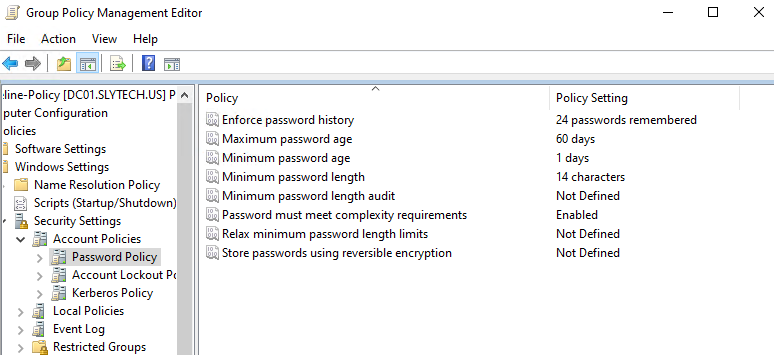
Account lockout policy locks the account after 5 failed attempts with a 15-minute lockout duration. That lockout threshold directly feeds into the incident detection work in A.5.25. If someone is brute-forcing an account, the account locks and Wazuh alerts before they can get anywhere.
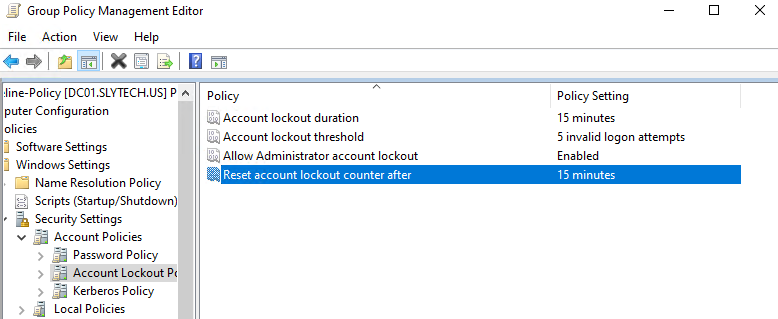
These settings land on every machine in the slytech.us domain through Group Policy. No manual configuration per machine, no relying on defaults. That’s what A.5.15 is asking for.
A.8.15 — Logging and Monitoring: Windows Events in Wazuh
Logging is only useful if someone is collecting and reviewing the logs. A.8.15 requires that systems generate audit logs and that those logs are monitored for anomalies.
The Wazuh agent on dc01 ships Windows Security Event logs to the SIEM automatically. Logon successes (event 4624), logoff events (4634), and failed authentication attempts all come through in real time.
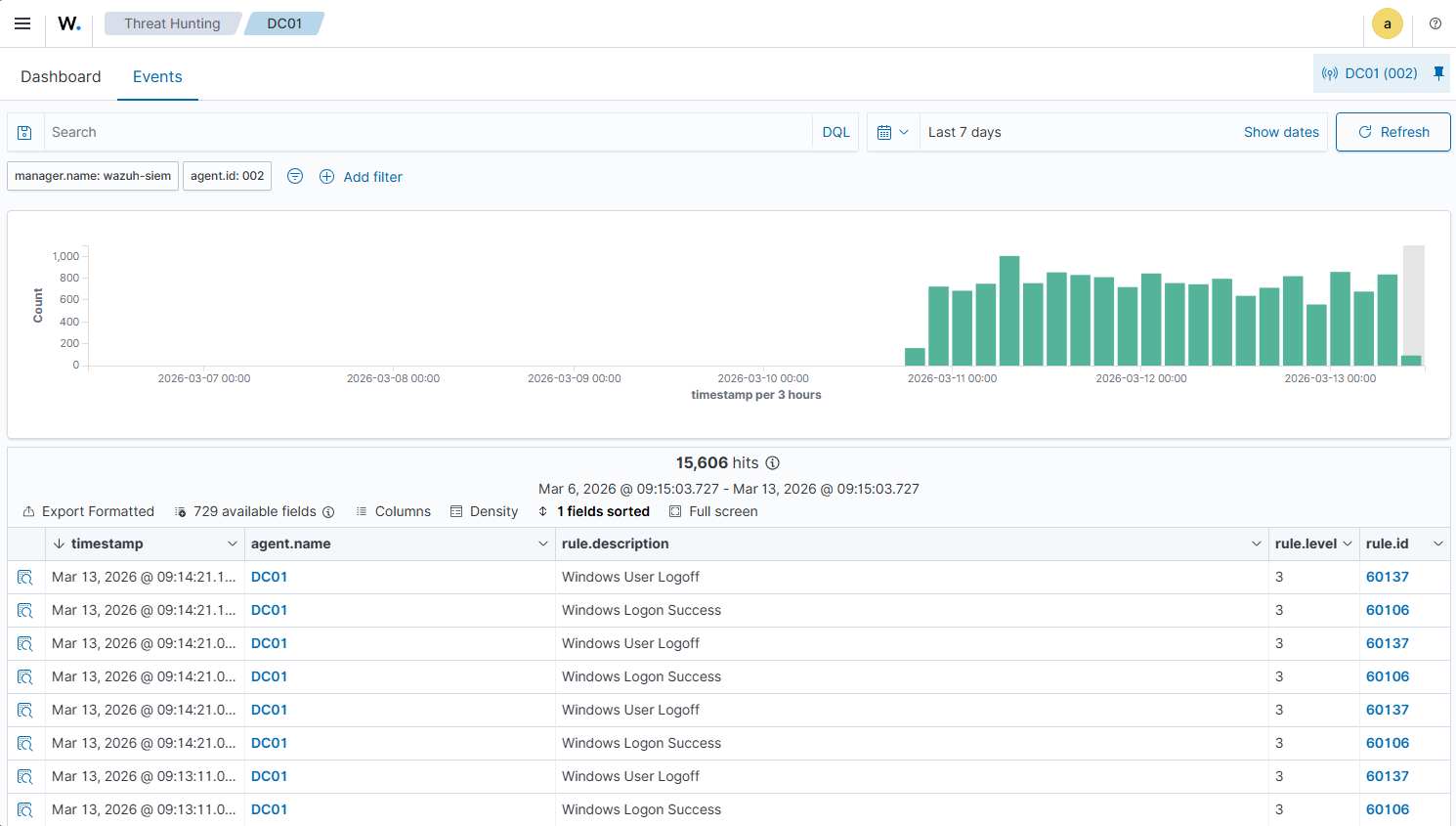
No manual log collection, no waiting for something to break. Every authentication event on the domain controller is in the SIEM within seconds of it happening. That’s the audit trail A.8.15 is looking for.
A.8.7 — Malware Defense: File Integrity Monitoring
Wazuh’s FIM module monitors files and registry keys for unauthorized changes. On dc01, it’s watching HKEY_LOCAL_MACHINE\System\CurrentControlSet by default, which covers the registry keys that malware commonly modifies to establish persistence.
The 112 FIM events over 7 days show normal system activity: Windows updates, policy applications, driver changes. That’s the baseline. If something unexpected modifies those keys, Wazuh catches it and alerts.
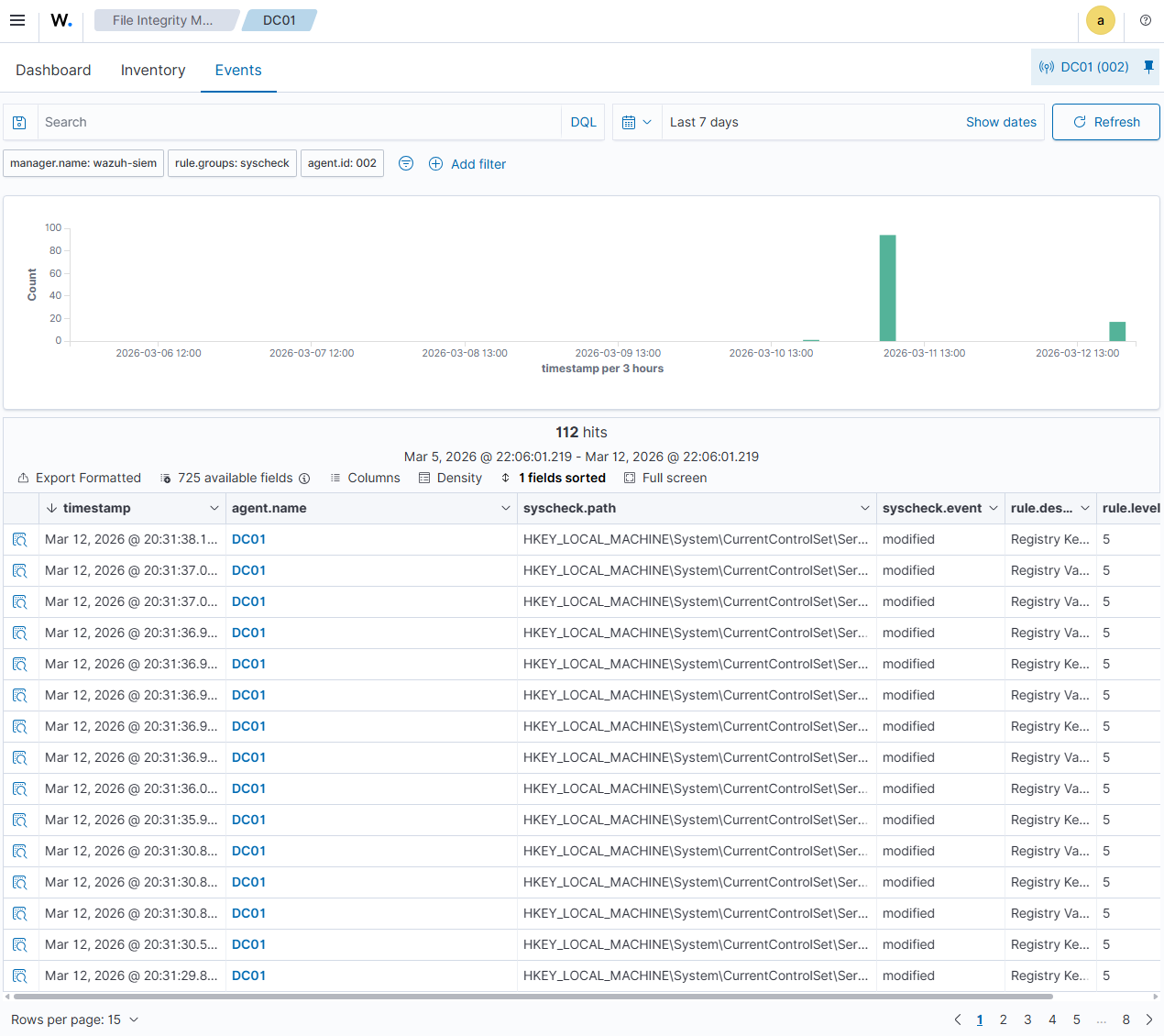
This is a lightweight control that runs passively. No performance impact, no configuration beyond what Wazuh installs by default, and it satisfies the A.8.7 requirement for malware defense through change detection.
A.8.8 — Vulnerability Management: OpenSCAP on linux-endpoint
Vulnerability management requires knowing what’s misconfigured before an attacker finds it. A.8.8 calls for a systematic process to identify vulnerabilities in information systems.
I stood up a fresh Rocky Linux 9 VM (linux-endpoint at 10.10.20.30) in the Corporate zone and ran an OpenSCAP assessment against the CIS Level 2 Server benchmark.
oscap xccdf eval \
  --profile xccdf_org.ssgproject.content_profile_cis \
  --results /tmp/scap-results.xml \
  --report /tmp/scap-report.html \
  /usr/share/xml/scap/ssg/content/ssg-rl9-ds.xml
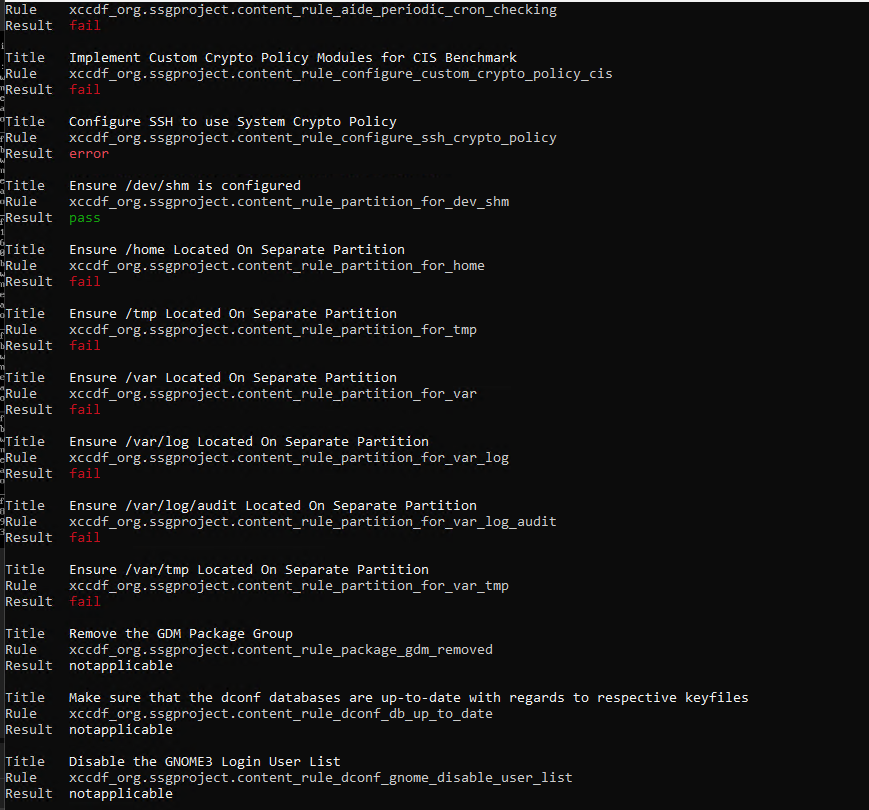
The scan runs through 361 rules covering partitioning, audit configuration, SSH hardening, crypto policy, and more.
A fresh minimal Rocky 9 install scored 69.07% against the CIS Level 2 benchmark. 165 rules passed, 167 failed, 29 inconclusive.
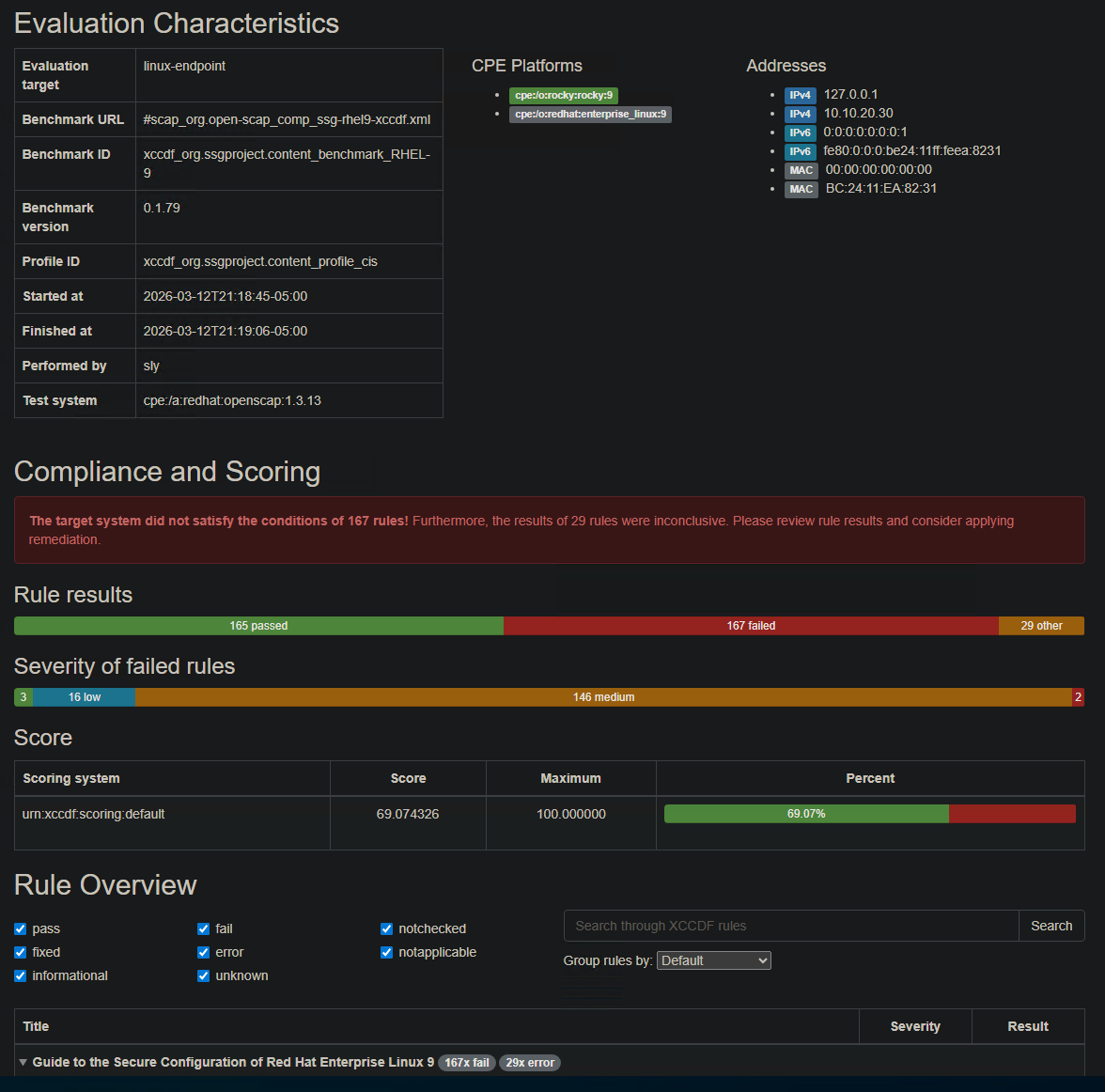
The failures aren’t surprising. A minimal install isn’t hardened. That’s the point of the scan. The 167 failed rules are the remediation backlog, the list of things that need to be fixed before this system is compliant. Most of them fall into the medium severity category: audit daemon configuration, SSH crypto policy, separate partitions for /var, /tmp, and /home.
Running this scan before deploying a system to production is exactly what A.8.8 requires. The report is the evidence.
A.5.25 — Incident Detection: Brute Force Attack and Alert
Detection controls need to be tested. A.5.25 requires that organizations detect and assess security events. The question is whether the detection actually fires when something happens.
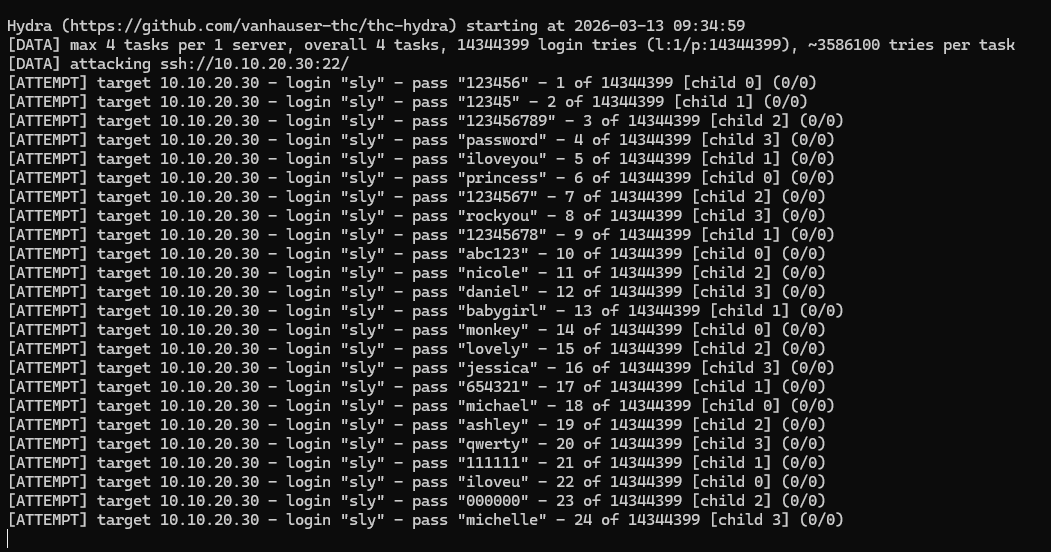
From kali-attack on the Workstation zone (10.10.30.10), I ran Hydra against the SSH service on linux-endpoint (10.10.20.30) in the Corporate zone. The pfSense rules allow Kali to reach its designated targets. The brute force ran rockyou.txt against the sly account.
hydra -l sly -P /usr/share/wordlists/rockyou.txt \
  -t 4 -V ssh://10.10.20.30
Wazuh caught it immediately. 799 events in under three minutes. Rule 2502 firing at level 10 (“User missed the password more than one time”) and rule 5760 (“sshd: authentication failed”) at level 5. The spike is visible in the timeline right at the moment Hydra started.
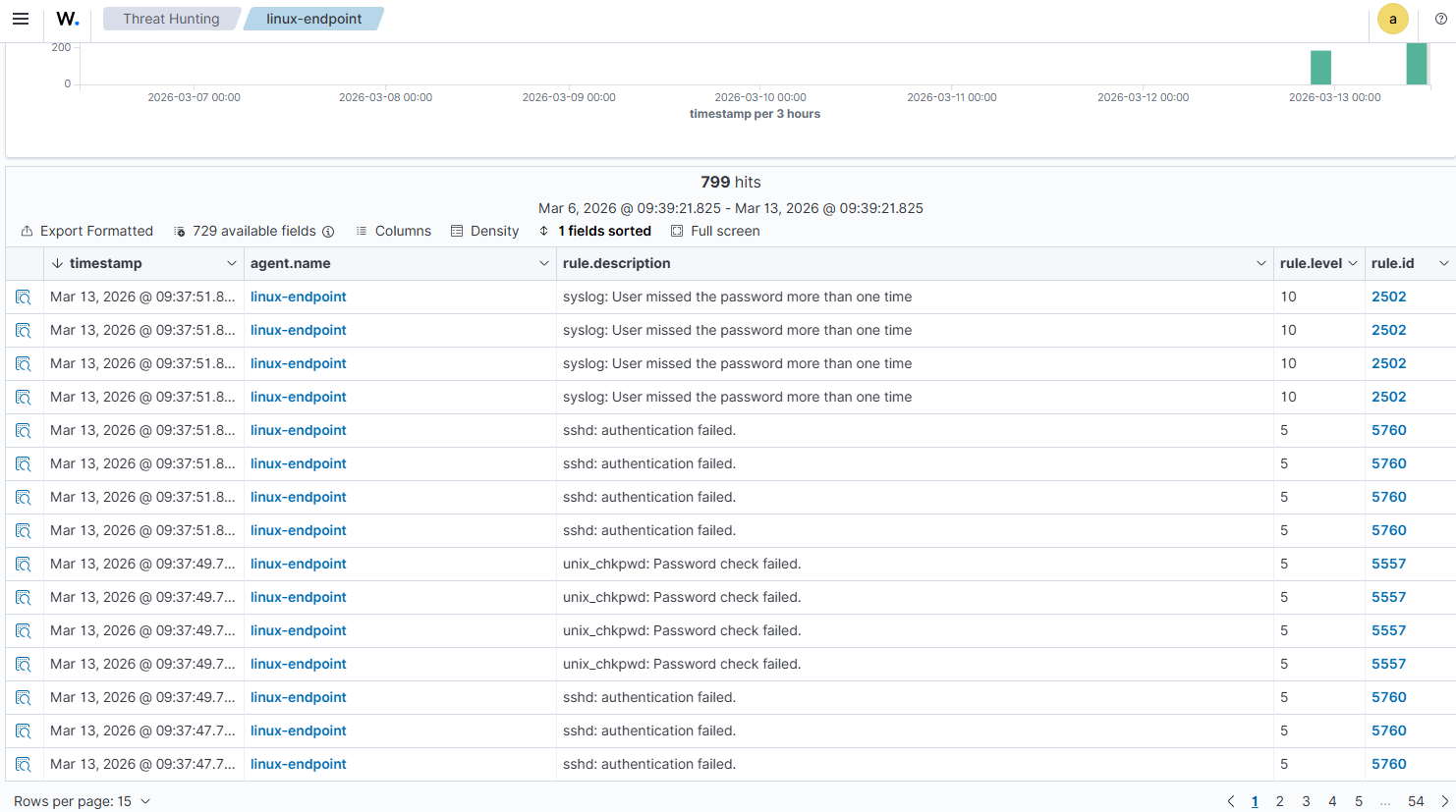
Under a hardened configuration, SSH could be paired with PAM to enforce a similar lockout threshold on linux-endpoint. Between that and the SIEM alert, an analyst would have this attack in their queue within seconds. That’s A.5.25 working as intended.
A.8.20 — Network Security: pfSense Zone Segmentation
Network segmentation is the control that made the brute force test meaningful. A.8.20 requires that networks are managed to protect systems from unauthorized access.
The pfSense setup enforces four separate zones with explicit rules between them. The key rule for this lab: CORPNET blocks traffic to the ATTACK zone where Kali lives. Kali can initiate connections to targets, but Corporate systems can’t reach back into the Workstation zone.
That one-way restriction means that even if a Corporate system were compromised, it couldn’t be used to pivot back to the attack machine or exfiltrate through that path. The segmentation makes lateral movement harder and makes the detection work in A.5.25 more meaningful because the attacker’s path is constrained.
The pfSense rules from Part 1 show the zone enforcement in place. The CORPNET block to ATTACK zone rule is explicit and active.
The Compliance Dashboard
Wazuh maps events to NIST 800-53 controls automatically as it collects them. NIST 800-53 and ISO 27001 Annex A share significant overlap, particularly in the access control (AC), audit (AU), and configuration management (CM) families.
After running the brute force test and collecting a week of logs, the NIST 800-53 dashboard shows 16,701 total alerts mapped to specific control requirements. AU.14 (audit log content) is the highest volume, which makes sense given all the authentication events from dc01 and the brute force events from linux-endpoint.
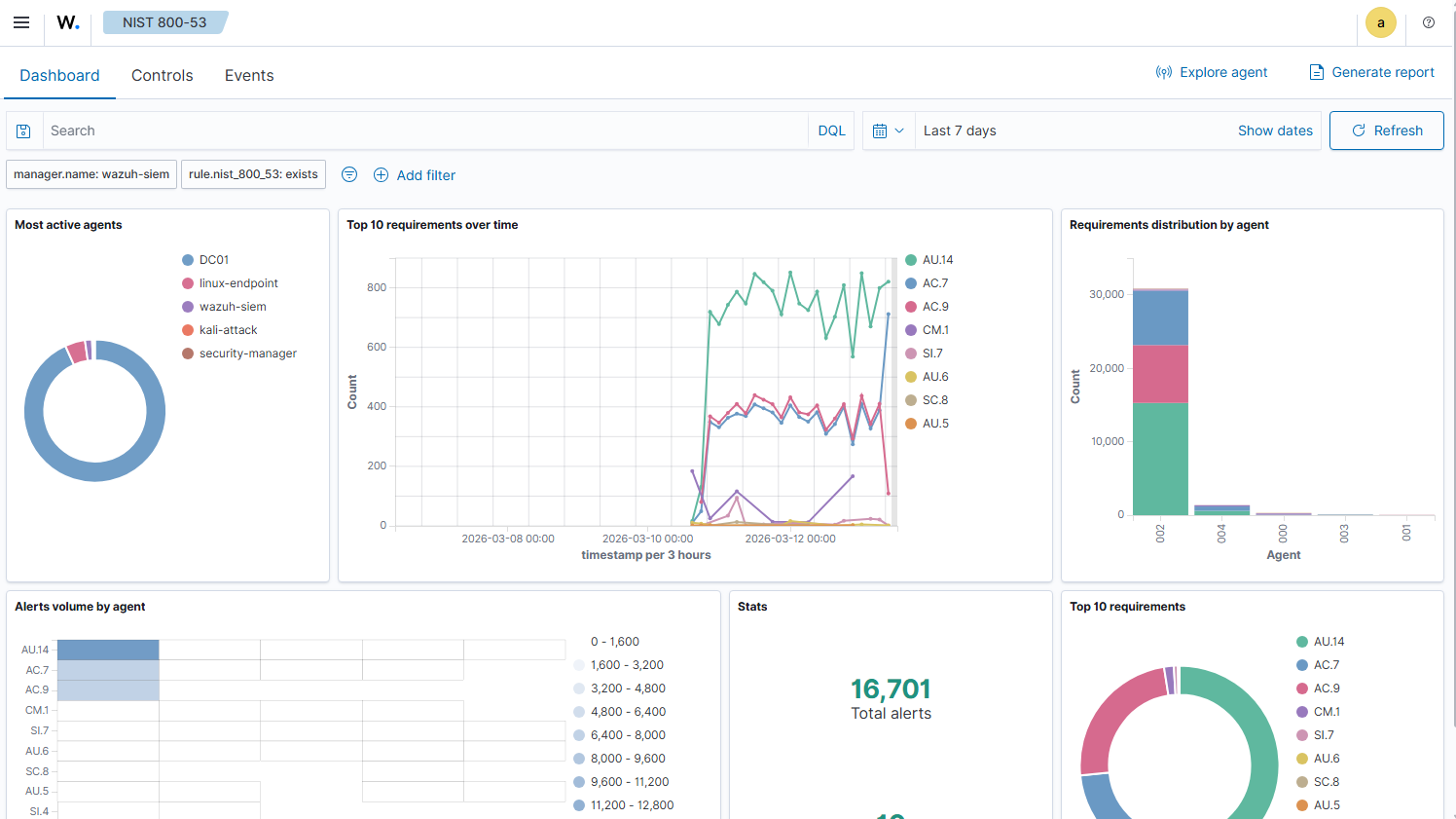
The spike on March 13 is the Hydra run. Visible in the timeline, attributed to linux-endpoint in the agent breakdown. That’s the kind of correlation that matters in a real SOC environment.
What the Evidence Shows
Six controls, six pieces of evidence. Here’s the summary:
| Control | Evidence | Tool |
|---|---|---|
| A.5.15 Access Control | GPO enforcing 14-char passwords, complexity, 5-attempt lockout | Active Directory / Group Policy |
| A.5.25 Incident Detection | 799 Wazuh alerts generated from 3-minute brute force | Wazuh + Hydra |
| A.8.7 Malware Defense | 112 FIM events monitoring dc01 registry changes | Wazuh FIM |
| A.8.8 Vulnerability Management | OpenSCAP CIS scan, 69.07% score, 167 remediations identified | OpenSCAP |
| A.8.15 Logging and Monitoring | Windows auth events shipping to SIEM in real time | Wazuh + dc01 agent |
| A.8.20 Network Security | pfSense CORPNET block to ATTACK zone enforced | pfSense |
None of this required enterprise tooling. All of it runs on a single Proxmox node with 32GB RAM. The tools are the same ones showing up in SOC job descriptions.
What’s Next
Part 3 maps this same lab to NIST CSF 2.0, covering all six functions: GOVERN, IDENTIFY, PROTECT, DETECT, RESPOND, and RECOVER. The RECOVER function is where the Proxmox Backup Server setup finally gets its moment, showing how snapshot and backup strategy maps to a formal recovery control.