Cloud Governance with Azure Policy, Terraform, and Log Analytics Workbooks
Provisioning Azure infrastructure as code with Terraform, enforcing governance with Azure Policy, and building a live security dashboard in Log Analytics Workbooks on top of the slytech.us hybrid environment.
Hybrid identity working. Endpoints managed. Everything running, nothing governed. No tagging standard, no policy enforcement, no central visibility into what was happening across the environment. Anyone could deploy a resource with no tags, no compliance check, nothing. This project fixes that.
Three tools, one goal: Azure Policy to enforce standards, Terraform to provision infrastructure as code, and Log Analytics Workbooks to pull everything into a single dashboard. This builds directly on the hybrid identity and endpoint management work from the previous two posts.
Why These Three Together
Policy enforces standards at deploy time. Terraform ensures the infrastructure that exists matches what’s in code. Workbooks surface what’s actually happening after everything is running. Each one covers what the others miss. That’s the governance loop: define, enforce, observe.
The Environment Going In
Same infrastructure, nothing torn down:
dc01: Windows Server 2025, AD DS, Entra Connect syncing 18 usersWIN11: Hybrid Entra joined, Intune enrolled, Defender for Endpoint reportingslytechlab.onmicrosoft.com: M365 Business Premium tenant, slytech.us primary domain- Azure free tier subscription connected to the same tenant
First step was standing up a resource group:
az group create --name rg-slytech-lab --location eastus
Terraform on Windows Server
Terraform doesn’t ship with Windows Server 2025. No winget, no package manager. Direct binary download:
$url = "https://releases.hashicorp.com/terraform/1.8.5/terraform_1.8.5_windows_amd64.zip"
$dest = "C:\terraform"
New-Item -ItemType Directory -Path $dest -Force
Invoke-WebRequest -Uri $url -OutFile "$dest\terraform.zip"
Expand-Archive -Path "$dest\terraform.zip" -DestinationPath $dest -Force
[Environment]::SetEnvironmentVariable("PATH", $env:PATH + ";C:\terraform", [EnvironmentVariableTarget]::Machine)
Same story for Azure CLI. The MSI installs fine but the PATH doesn’t update in the current PowerShell session. Close and reopen after installing or az won’t be recognized.
After installing both, authenticated to Azure:
az login
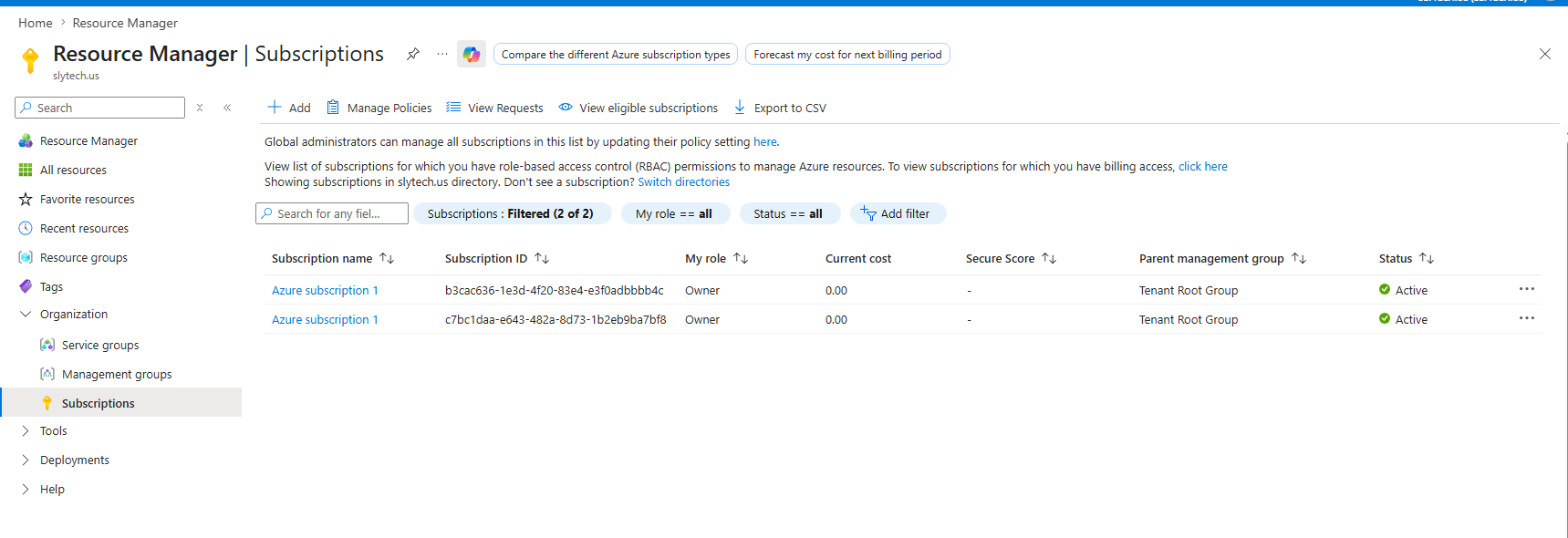
Two subscriptions showed up. The free tier subscription tied to slytech.us was the right one.
The Infrastructure
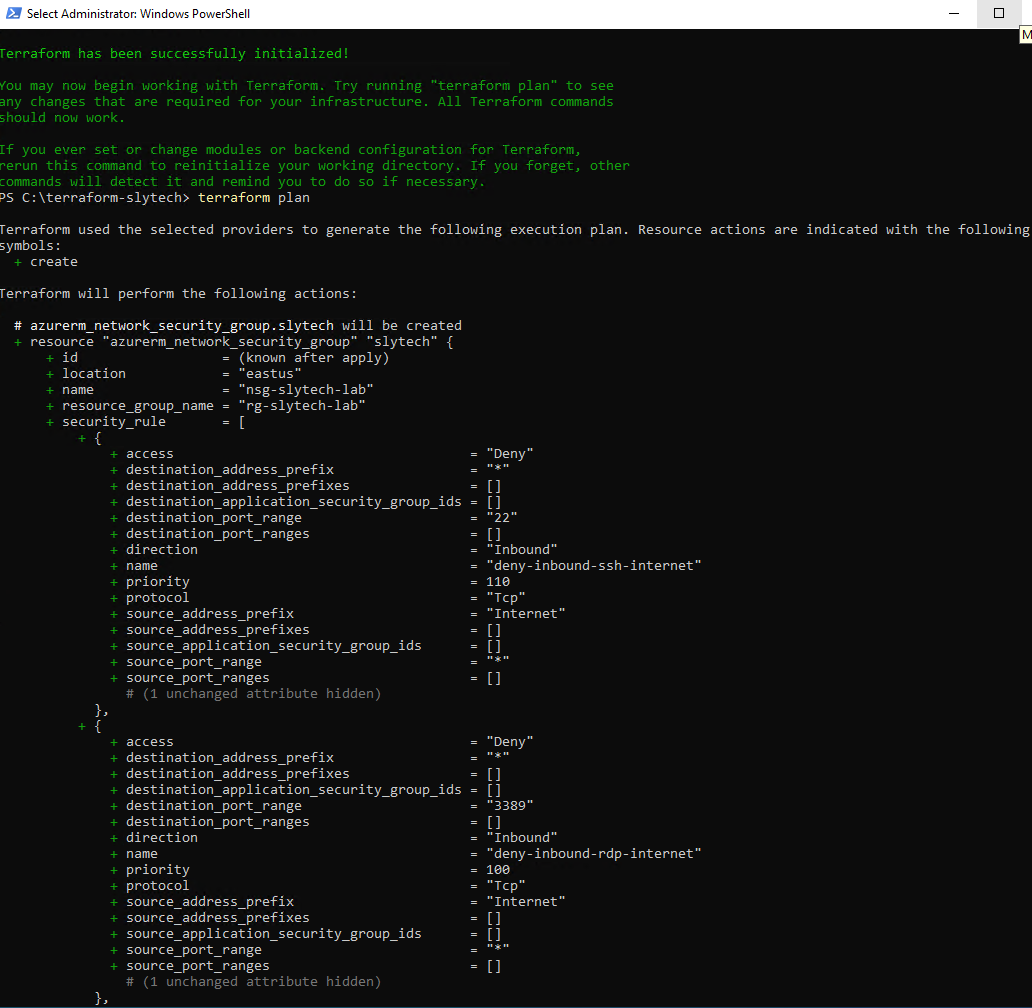
Kept Terraform intentionally small. A VNet, a subnet, and an NSG with inbound RDP and SSH deny rules from the internet. The point of IaC in this lab isn’t a complex environment, it’s that everything that exists is defined in code and can be reproduced exactly.
terraform {
  required_providers {
    azurerm = {
      source  = "hashicorp/azurerm"
      version = "~> 3.0"
    }
  }
}

provider "azurerm" {
  features {}
  subscription_id = "c7bc1daa-e643-482a-8d73-1b2eb9ba7bf8"
}

resource "azurerm_resource_group" "slytech" {
  name     = "rg-slytech-lab"
  location = "East US"
  tags = {
    Environment = "Lab"
    Owner       = "SlyTech"
    Project     = "Homelab"
  }
}

resource "azurerm_virtual_network" "slytech" {
  name                = "vnet-slytech-lab"
  address_space       = ["10.1.0.0/16"]
  location            = azurerm_resource_group.slytech.location
  resource_group_name = azurerm_resource_group.slytech.name
  tags = {
    Environment = "Lab"
    Owner       = "SlyTech"
    Project     = "Homelab"
  }
}

resource "azurerm_subnet" "slytech" {
  name                 = "snet-slytech-lab"
  resource_group_name  = azurerm_resource_group.slytech.name
  virtual_network_name = azurerm_virtual_network.slytech.name
  address_prefixes     = ["10.1.1.0/24"]
}

resource "azurerm_network_security_group" "slytech" {
  name                = "nsg-slytech-lab"
  location            = azurerm_resource_group.slytech.location
  resource_group_name = azurerm_resource_group.slytech.name

  security_rule {
    name                       = "deny-inbound-rdp-internet"
    priority                   = 100
    direction                  = "Inbound"
    access                     = "Deny"
    protocol                   = "Tcp"
    source_port_range          = "*"
    destination_port_range     = "3389"
    source_address_prefix      = "Internet"
    destination_address_prefix = "*"
  }

  security_rule {
    name                       = "deny-inbound-ssh-internet"
    priority                   = 110
    direction                  = "Inbound"
    access                     = "Deny"
    protocol                   = "Tcp"
    source_port_range          = "*"
    destination_port_range     = "22"
    source_address_prefix      = "Internet"
    destination_address_prefix = "*"
  }

  tags = {
    Environment = "Lab"
    Owner       = "SlyTech"
    Project     = "Homelab"
  }
}
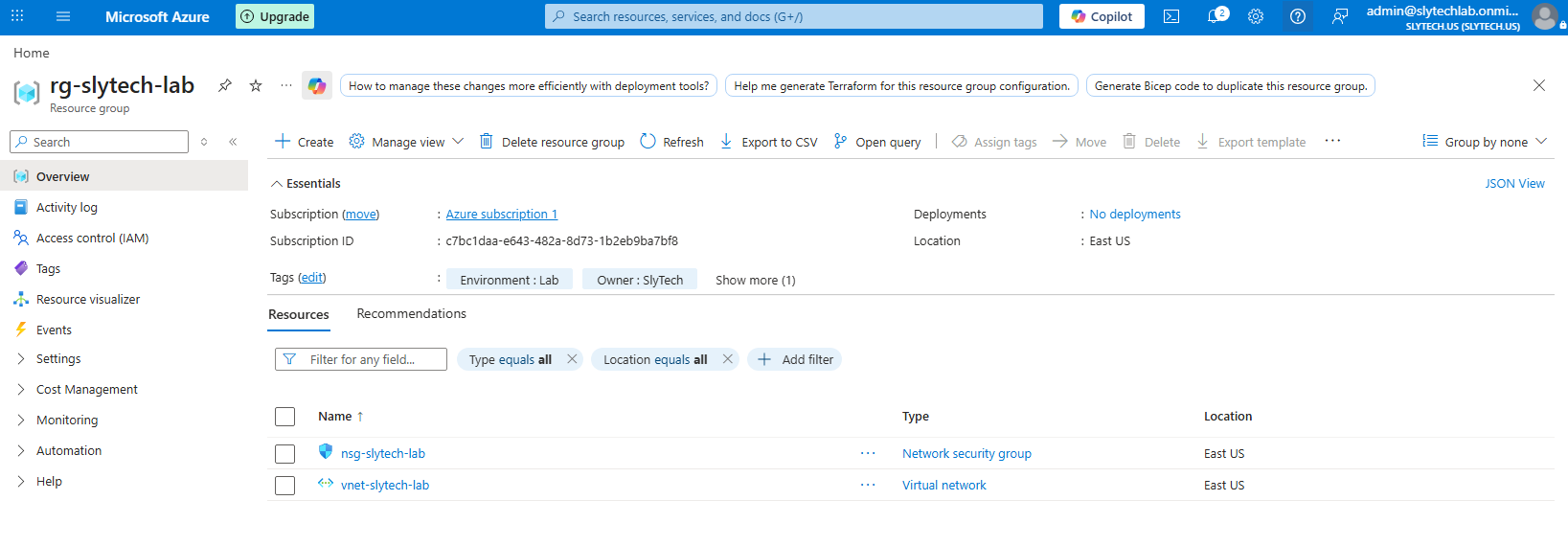
The resource group already existed from the portal. Terraform threw an error:
Error: A resource with the ID "/subscriptions/.../resourceGroups/rg-slytech-lab"
already exists - to be managed via Terraform this resource needs to be imported into the State.
This is the right error. Terraform won’t silently adopt resources it didn’t create. Import it explicitly:
terraform import azurerm_resource_group.slytech /subscriptions/c7bc1daa-e643-482a-8d73-1b2eb9ba7bf8/resourceGroups/rg-slytech-lab
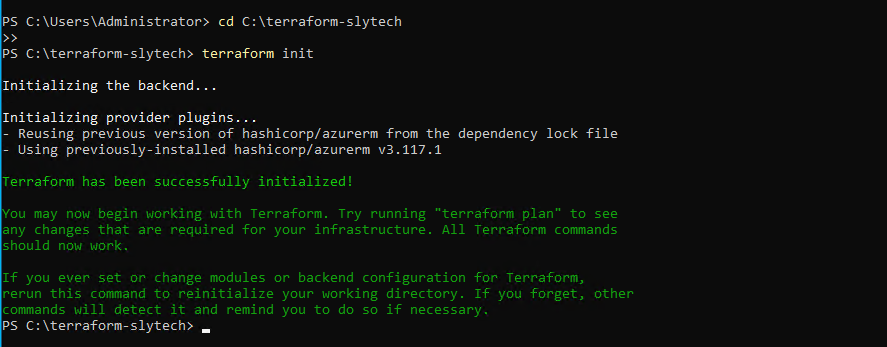
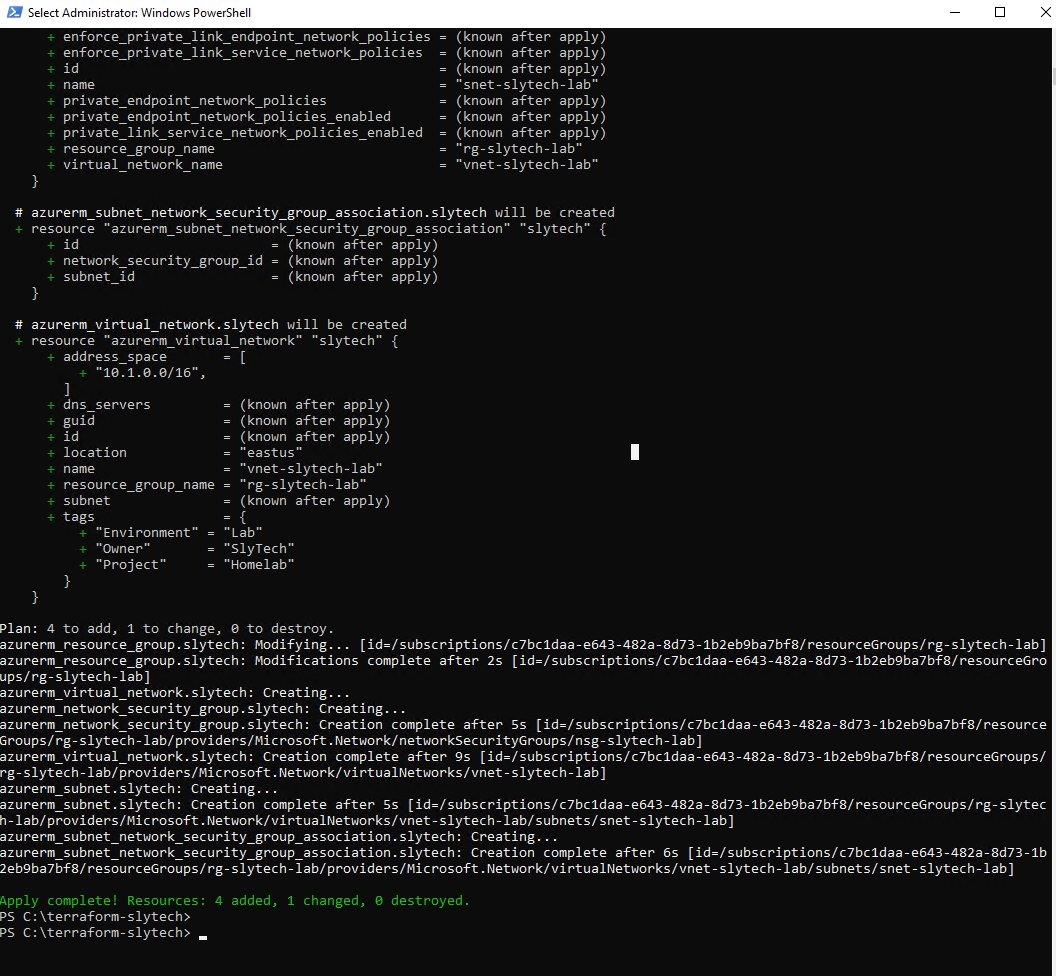
After the import, terraform plan showed 4 resources to add, 1 to change. Apply went clean.
Azure Policy: Where It Gets Interesting
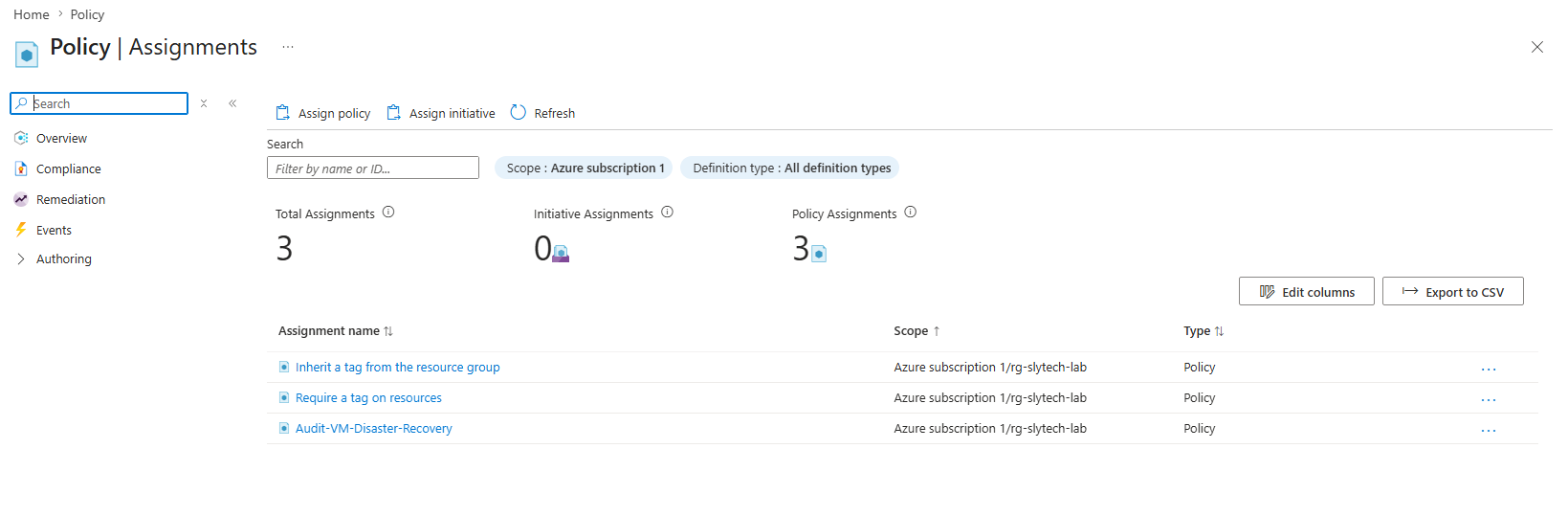
Three policies assigned to rg-slytech-lab:
- Require a tag on resources — any resource missing the
Environmenttag gets blocked at deploy time - Inherit a tag from the resource group — resources automatically inherit tags from the parent RG
- Audit VMs without disaster recovery configured — flags VMs not covered by Azure Site Recovery
The tag policy is set to deny, not audit. Audit mode logs violations. Deny mode stops them.
The policy proved itself immediately when trying to deploy the Log Analytics workspace through the portal. Filled in all the fields, clicked Create, and got this:
{
  "code": "RequestDisallowedByPolicy",
  "message": "Resource 'law-slytech-lab' was disallowed by policy.",
  "details": [{
    "policyDefinitionDisplayName": "Require a tag on resources"
  }]
}
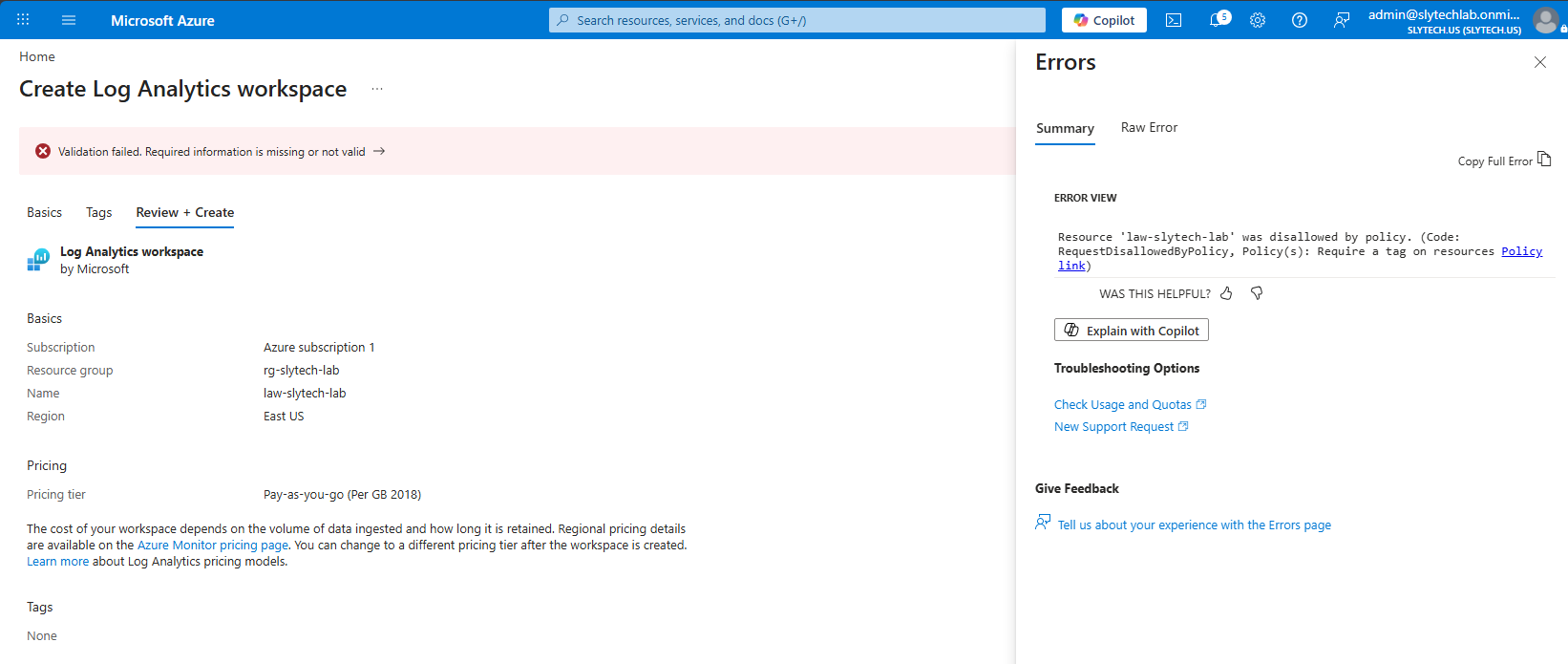
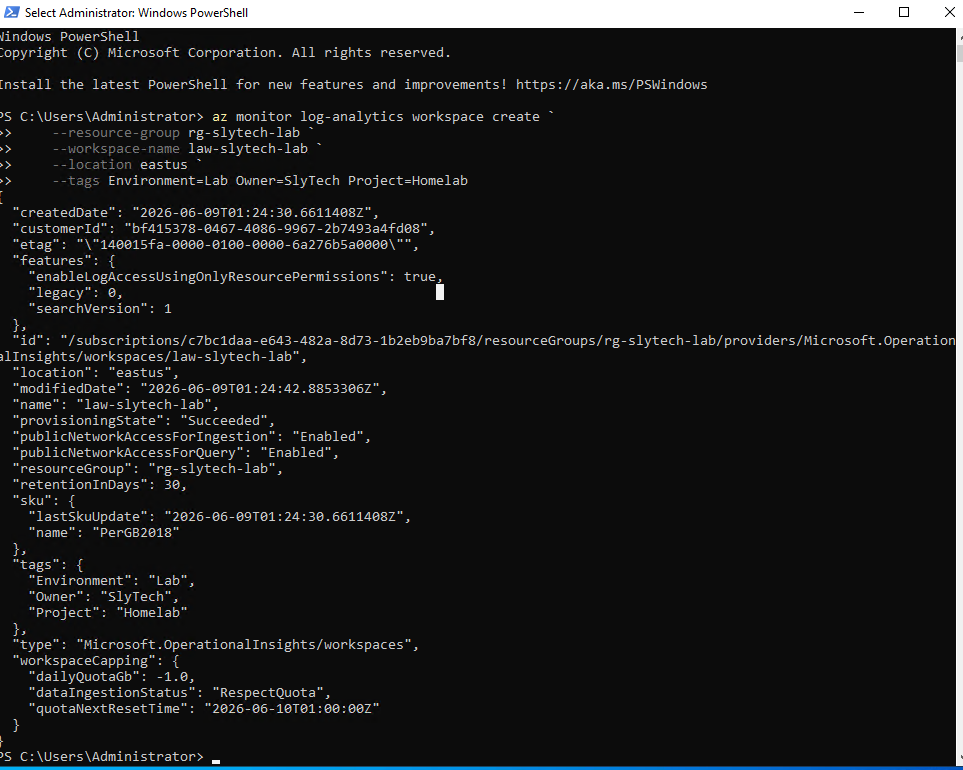
The portal form had a Tags tab. Filled it in. Same error. The portal wasn’t passing the tags correctly to the API. Switched to Azure CLI with inline tags:
az monitor log-analytics workspace create \
    --resource-group rg-slytech-lab \
    --workspace-name law-slytech-lab \
    --location eastus \
    --tags Environment=Lab Owner=SlyTech Project=Homelab
Deployed in seconds. The CLI passes tags directly in the API call without the portal form translation layer getting in the way. Worth remembering any time portal deployments get blocked by tag policies.
Connecting the Data
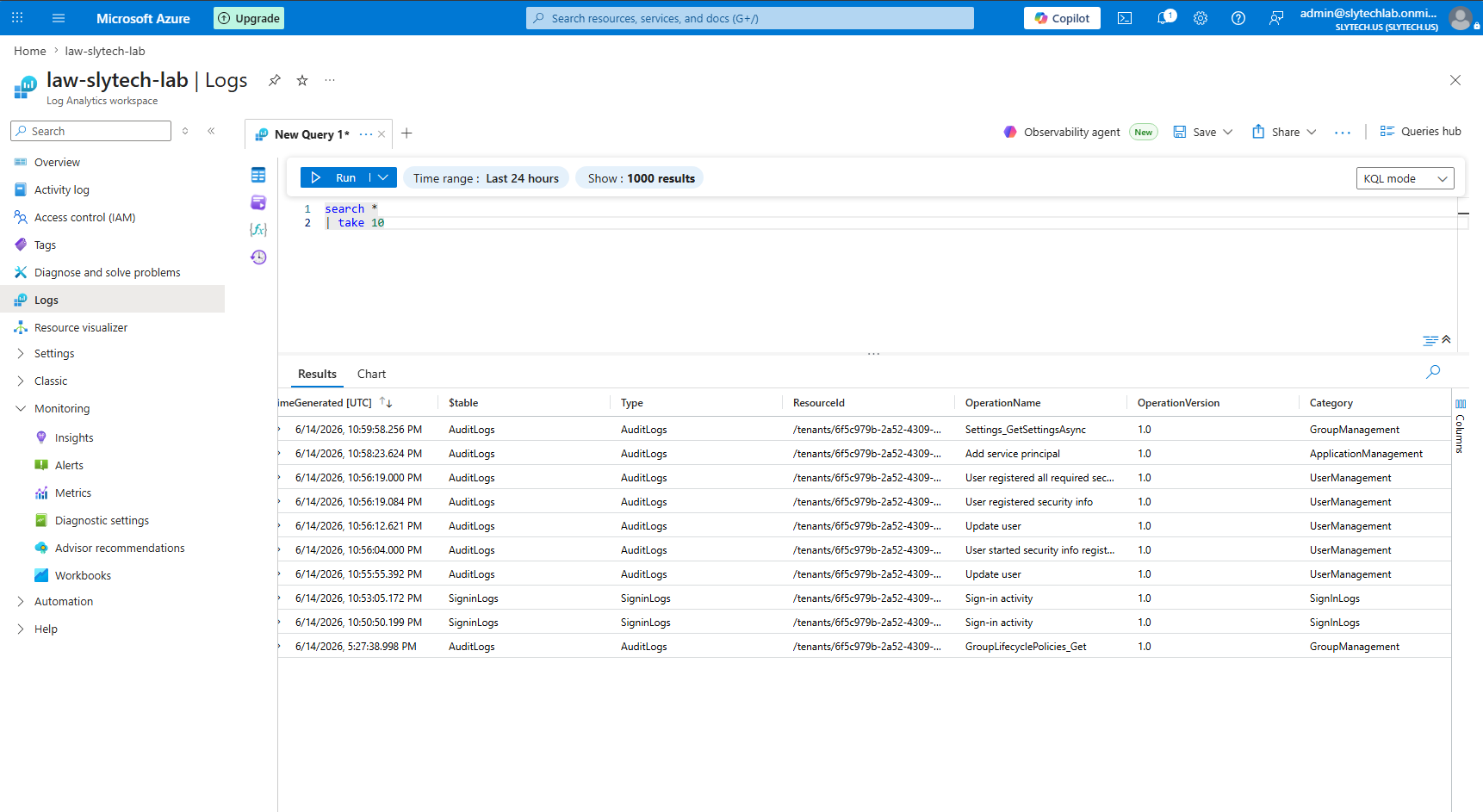
With the workspace running, connected Entra ID diagnostic settings to start streaming identity logs: AuditLogs, SignInLogs, ProvisioningLogs. Navigate to Entra admin center > Diagnostic settings > Add diagnostic setting, point it at law-slytech-lab, save.
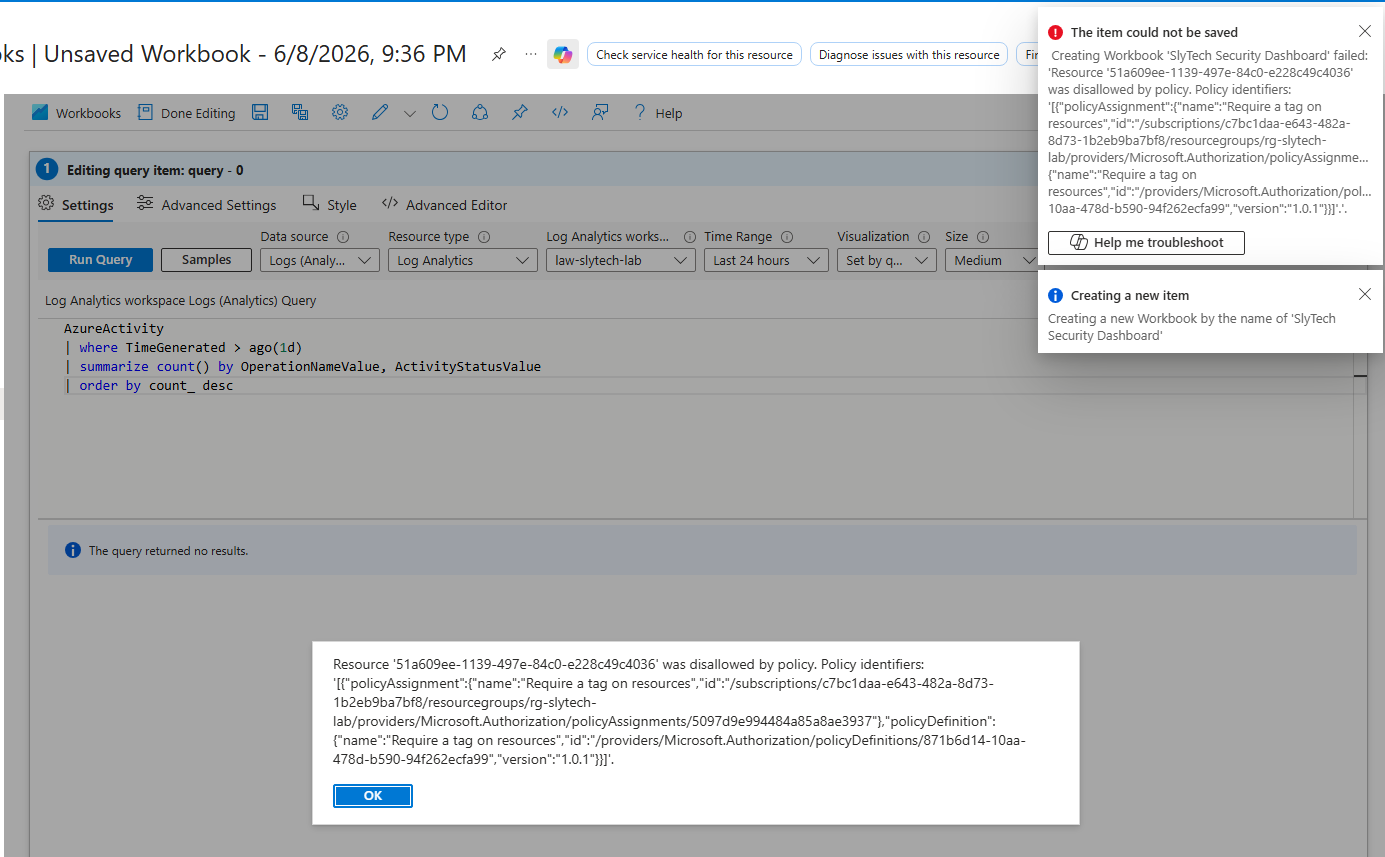
The same policy that blocked the Log Analytics deployment also blocked saving the workbook on the first attempt. The workbook is a resource too and needed the Environment tag. Added the tags and it saved cleanly. Policy enforcing consistently across every resource type in scope, exactly as designed.
The Dashboard
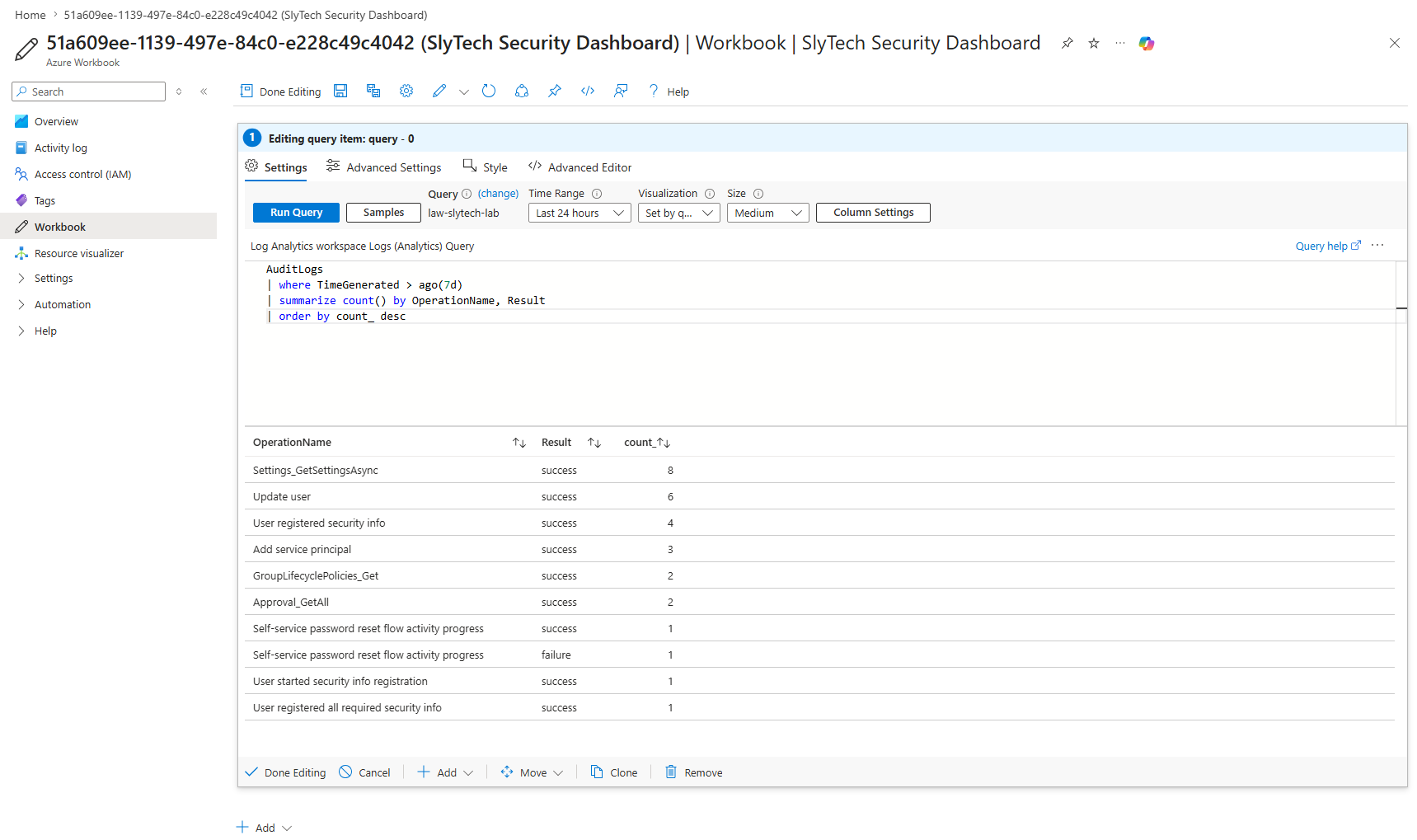
The SlyTech Security Dashboard workbook lives in rg-slytech-lab alongside the rest of the infrastructure. Two KQL queries pulling from the connected workspace:
Audit activity summary:
AuditLogs
| where TimeGenerated > ago(7d)
| summarize count() by OperationName, Result
| order by count_ desc
Sign-in activity:
SignInLogs
| where TimeGenerated > ago(2h)
| take 10
The workspace was empty for the first hour after connecting the diagnostic setting. Once sign-in activity was generated by logging in as mwebb, rholt, and cnovak, logs started flowing within 20-30 minutes.
The first query results showed what had been happening in the tenant:
Settings_GetSettingsAsync— 8 successful callsUpdate user— 6 successful operationsUser registered security info— 4 eventsAdd service principal— 3 operationsSelf-service password reset flow activity progress— 1 success, 1 failure
That last one is interesting. A failed password reset attempt sitting in the audit logs is exactly the kind of event that matters in a real SOC environment.
Wrapping Up
The tag policy on deny mode means there’s no way to deploy a resource without compliance, not even accidentally through the portal. The workbook blocked on the first save attempt because a workbook is a resource too. That’s the policy doing exactly what it’s supposed to do, consistently across every resource type.
The portal tag form issue is a useful thing to know: when a portal deployment gets blocked by a tag policy even after filling in the Tags tab, switch to the CLI. It passes tags directly in the API call and bypasses the form translation layer.
What’s Next
With governance in place and telemetry flowing, the natural next step is detection. Microsoft Sentinel sits on top of Log Analytics and turns the audit data already flowing in into actionable alerts. Connecting Sentinel to the existing workspace and building detection rules around the sign-in and audit activity closes the loop between identity governance and security operations.