Building a PAM Labl: Tiered Admins, JIT Access, and Privilege Escalation Detection
Most identity programs treat all admin accounts the same. One Domain Admins group, everyone who needs elevated access goes in, and nobody audits it until something goes wrong. That works until a help desk technician’s credentials get compromised and the attacker walks straight into your domain controllers because that technician was in Domain Admins.
Privileged Access Management exists to stop exactly that. This lab builds a full PAM implementation on top of the IAM lab I published last week, same Citadel infrastructure, same domain, extended with tiered admin accounts, JIT elevation, a privileged account audit script, service account security examples, and a live privilege escalation simulation with event log evidence.

Everything is built on dc01 (Windows Server 2025, slytech.us domain). No new VMs. Five scenarios, all scripted, all logged.
Why tiered administration matters
The core problem with flat admin models is lateral movement. If every admin account has the same privileges, an attacker who compromises any one of them gets everything. Microsoft’s privileged access tiering model breaks that by creating hard boundaries between tiers:
- Tier 0: Domain Controllers and domain admin accounts. The crown jewels. Nothing touches these systems except Tier 0 accounts.
- Tier 1: Server administrators. Can manage member servers, cannot touch Domain Controllers.
- Tier 2: Workstation administrators. Help desk, endpoint support. Cannot touch servers or Domain Controllers.
The boundaries are enforced by GPO, not just convention. A Tier 2 account that tries to RDP into a server gets denied at the policy level, not because someone remembers to check.
Lab infrastructure
Built on top of the existing IAM lab:
dc01: Windows Server 2025, AD DS, DNS, GPO hubfs01: Windows Server 2025, department file sharesWS01: Windows 11, Sales department, domain-joinedWS02: Windows 11, IT department, domain-joined
The IAM lab’s OU structure, role groups, resource groups, and provisioning scripts are all still in place. PAM extends it without touching anything already built.
Scenario 1: Tiered admin model
OU structure
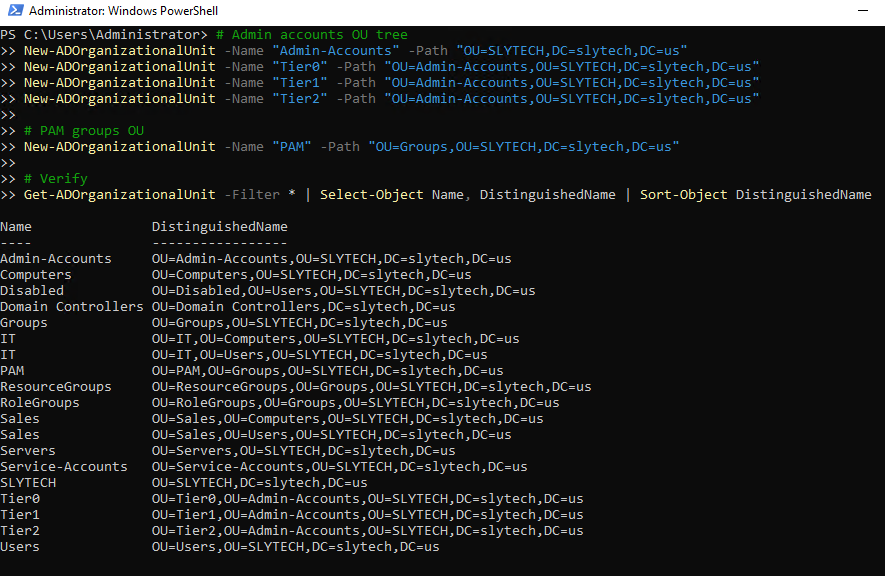
The first thing that goes in is a dedicated OU tree for admin accounts, completely separate from the regular Users OU. Mixing admin accounts with standard users in the same OU is asking for GPO misapplication and access review confusion.
New-ADOrganizationalUnit -Name "Admin-Accounts" -Path "OU=SLYTECH,DC=slytech,DC=us"
New-ADOrganizationalUnit -Name "Tier0" -Path "OU=Admin-Accounts,OU=SLYTECH,DC=slytech,DC=us"
New-ADOrganizationalUnit -Name "Tier1" -Path "OU=Admin-Accounts,OU=SLYTECH,DC=slytech,DC=us"
New-ADOrganizationalUnit -Name "Tier2" -Path "OU=Admin-Accounts,OU=SLYTECH,DC=slytech,DC=us"
New-ADOrganizationalUnit -Name "PAM" -Path "OU=Groups,OU=SLYTECH,DC=slytech,DC=us"
PAM groups
Five groups covering tier membership, JIT eligibility, and service account tracking:
New-ADGroup -Name "PAM-Tier0-Admins" -GroupScope Global -GroupCategory Security -Path "OU=PAM,OU=Groups,OU=SLYTECH,DC=slytech,DC=us" -Description "Tier 0: Domain Controller and domain admin access"
New-ADGroup -Name "PAM-Tier1-Admins" -GroupScope Global -GroupCategory Security -Path "OU=PAM,OU=Groups,OU=SLYTECH,DC=slytech,DC=us" -Description "Tier 1: Server administrator access"
New-ADGroup -Name "PAM-Tier2-Admins" -GroupScope Global -GroupCategory Security -Path "OU=PAM,OU=Groups,OU=SLYTECH,DC=slytech,DC=us" -Description "Tier 2: Workstation administrator access"
New-ADGroup -Name "PAM-JIT-Eligible" -GroupScope Global -GroupCategory Security -Path "OU=PAM,OU=Groups,OU=SLYTECH,DC=slytech,DC=us" -Description "Accounts approved for JIT privilege elevation"
New-ADGroup -Name "PAM-Service-Accounts" -GroupScope Global -GroupCategory Security -Path "OU=PAM,OU=Groups,OU=SLYTECH,DC=slytech,DC=us" -Description "Service account inventory and tracking"
Admin account naming convention
Every admin account follows a strict naming pattern. The name tells you exactly what tier the account belongs to before you even look at its group memberships:
| Regular account | Tier 1 admin | Tier 0 admin |
|---|---|---|
| mwebb | mwebb.admin.t1 | mwebb.admin.t0 |
| rholt | rholt.admin.t1 | rholt.admin.t0 |
| cnovak | cnovak.admin.t2 | (Tier 2 only) |
Six accounts total: two Tier 0, two Tier 1, two Tier 2. Tier 0 accounts go into Domain Admins. Tier 1 and Tier 2 stay out.
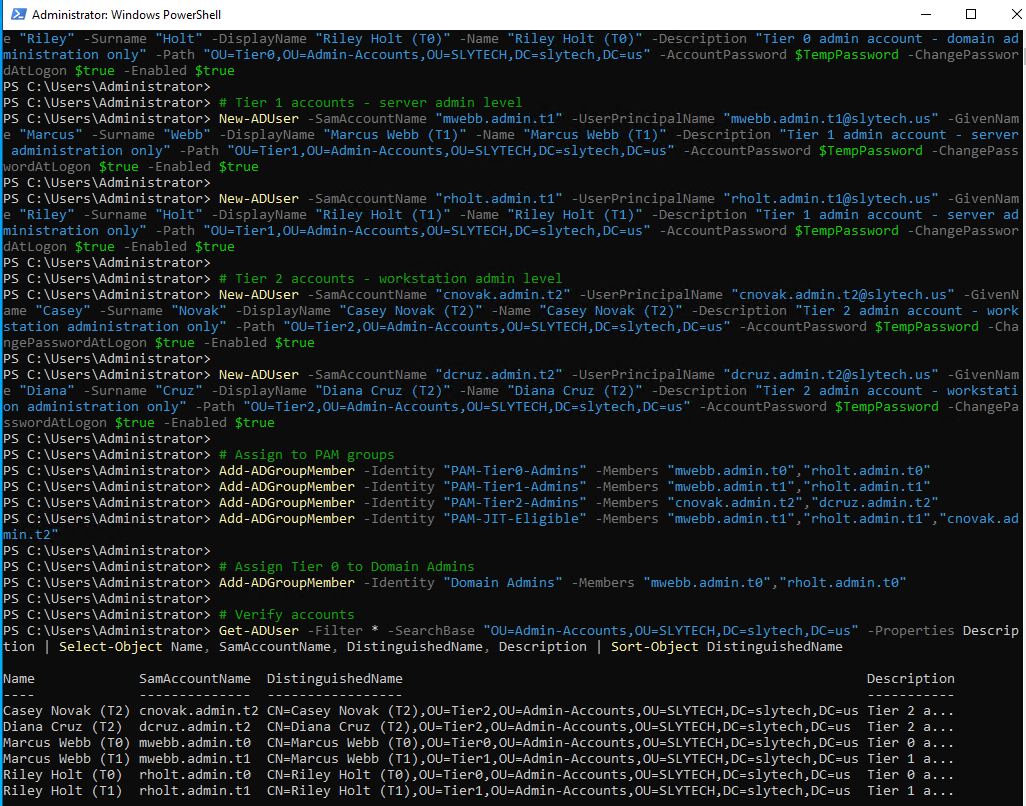
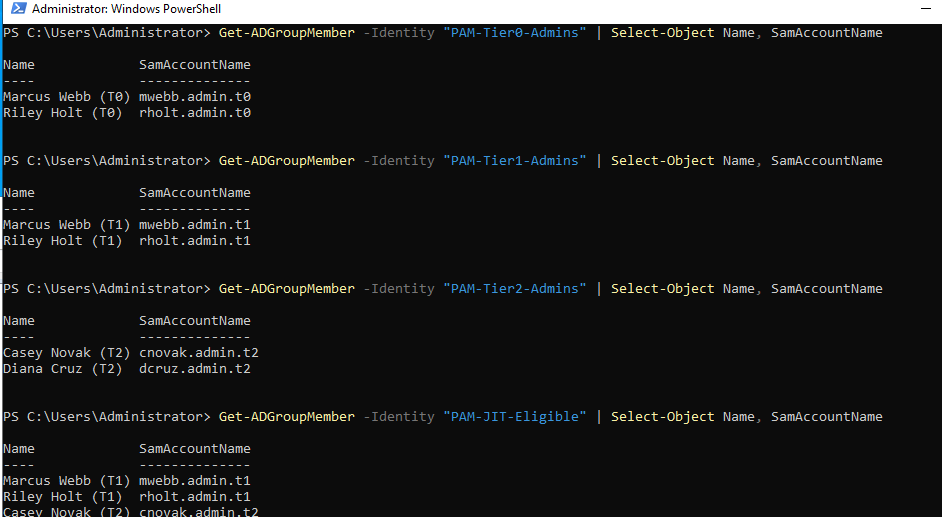
Worth noting: when I ran the group membership verification, I found secadmin already sitting in Domain Admins. That account predates the PAM structure and doesn’t follow the naming convention. It’s exactly the kind of finding the audit script in Scenario 3 is designed to surface. I left it in place intentionally as a real finding for the audit report.
GPO logon restrictions
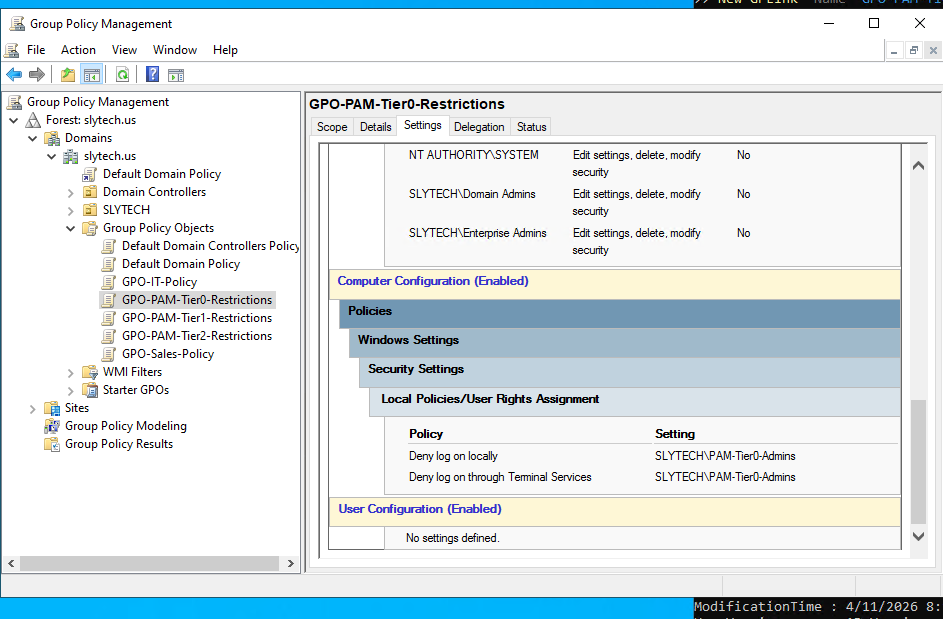
The naming convention means nothing without enforcement. Three GPOs lock down which accounts can log into which systems:
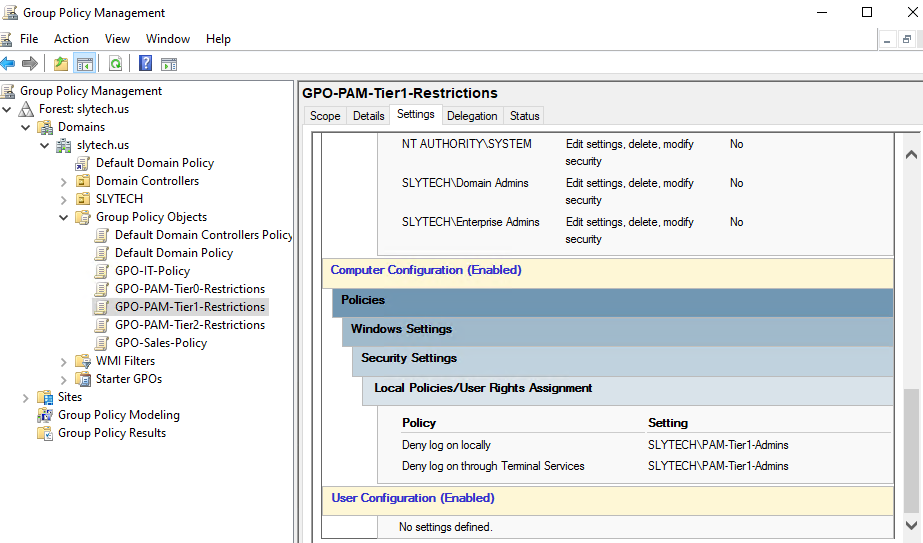
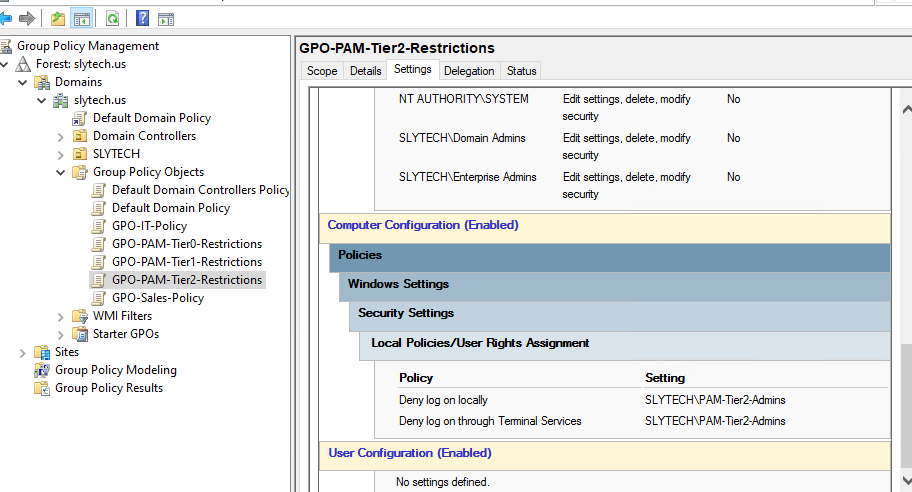
GPO-PAM-Tier0-Restrictions: Deny log on locally + Deny log on through Terminal Services for PAM-Tier0-Admins, linked to the Domain Controllers OUGPO-PAM-Tier1-Restrictions: Same deny policies for PAM-Tier1-Admins, linked to the Servers OUGPO-PAM-Tier2-Restrictions: Same deny policies for PAM-Tier2-Admins, linked to the Computers OU
The logic might seem backwards at first. Why deny Tier 0 accounts from logging into Domain Controllers? Because Tier 0 accounts should never be used for interactive sessions at all. They exist for specific domain admin tasks only, not for browsing the web or reading email on a DC. The deny policy enforces that boundary technically instead of relying on policy compliance.
Scenario 2: Just-in-time privilege elevation
JIT is the answer to a real operational problem. Someone needs elevated access for a specific task. You could add them to a privileged group, trust them to tell you when they’re done, and remove them manually. Or you could automate the entire lifecycle so the access grants itself, times out, and revokes itself with a full audit trail.
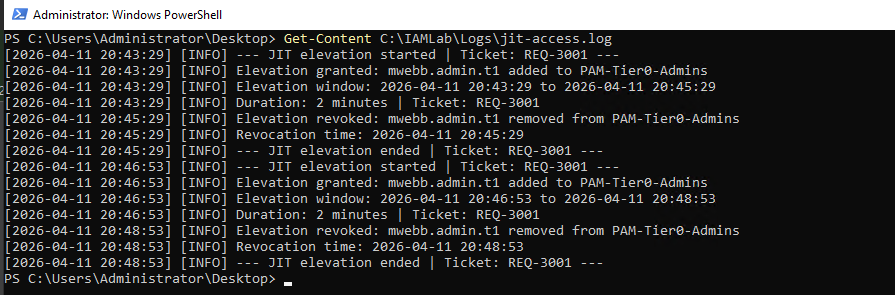
The script takes four parameters: the account requesting elevation, the target group, the duration in minutes, and a ticket number. It validates that the account is in PAM-JIT-Eligible before doing anything. No eligibility, no elevation.
.\Invoke-JITAccess.ps1 -SamAccountName "mwebb.admin.t1" -TargetGroup "PAM-Tier0-Admins" -DurationMinutes 2 -TicketNumber "REQ-3001"
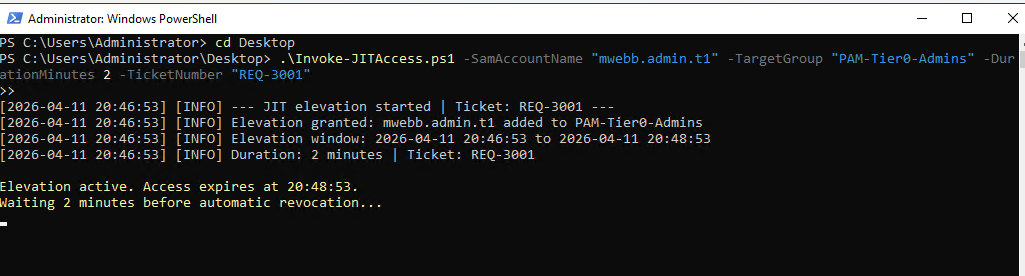
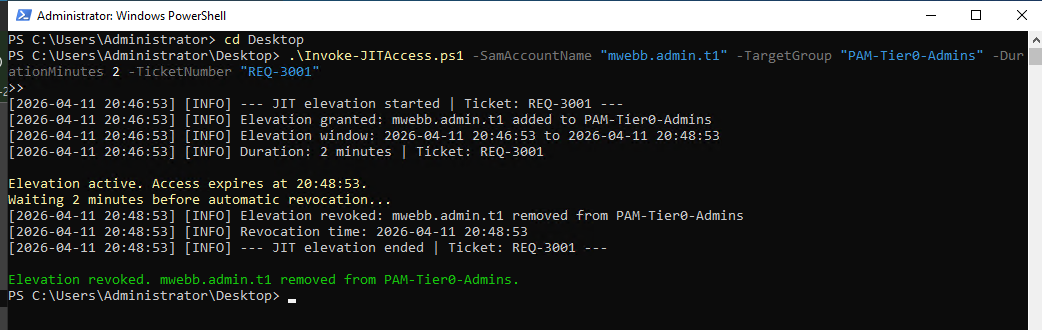
The log tells the complete story:
[2026-04-11 20:46:53] [INFO] --- JIT elevation started | Ticket: REQ-3001 ---
[2026-04-11 20:46:53] [INFO] Elevation granted: mwebb.admin.t1 added to PAM-Tier0-Admins
[2026-04-11 20:46:53] [INFO] Elevation window: 2026-04-11 20:46:53 to 2026-04-11 20:48:53
[2026-04-11 20:46:53] [INFO] Duration: 2 minutes | Ticket: REQ-3001
[2026-04-11 20:48:53] [INFO] Elevation revoked: mwebb.admin.t1 removed from PAM-Tier0-Admins
[2026-04-11 20:48:53] [INFO] Revocation time: 2026-04-11 20:48:53
[2026-04-11 20:48:53] [INFO] --- JIT elevation ended | Ticket: REQ-3001 ---
Granted at 20:46:53. Revoked at 20:48:53. Exactly two minutes. The ticket number ties it back to the original request. In production you’d set the duration to something like 480 minutes for an 8-hour work window, and you’d trigger this from a service desk workflow instead of running it manually.
Scenario 3: Privileged account audit
The audit script runs against every privileged group in the domain and produces a structured report. It checks for stale accounts, flags unexpected memberships, identifies accounts with AdminCount = 1, and exports to CSV and optionally JSON.
.\Get-PrivilegedAccountAudit.ps1 -StaleDays 30 -ExportJson
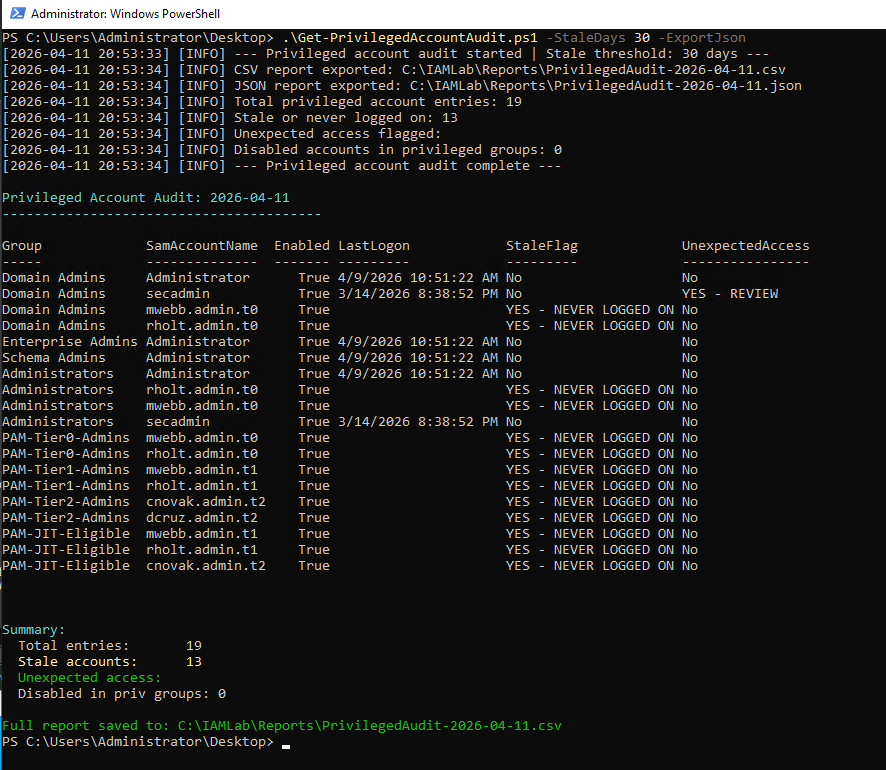
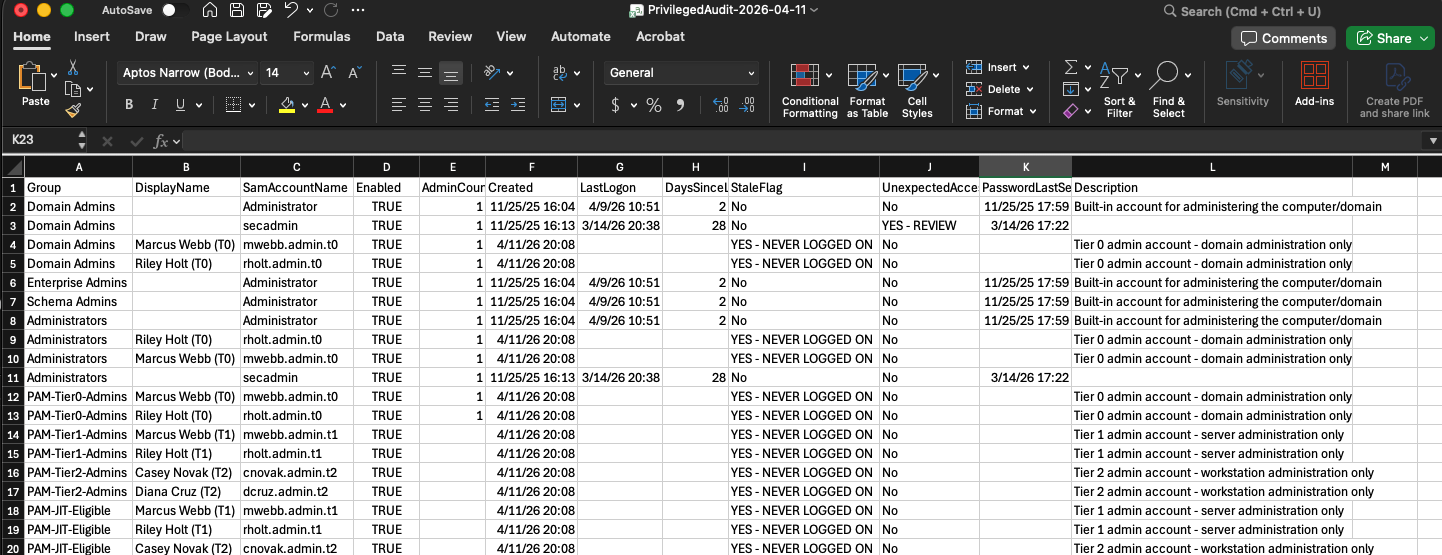
The audit found 19 privileged account entries across 8 groups. 13 flagged as stale or never logged on, which is expected for freshly created lab accounts. The finding that matters is secadmin in Domain Admins flagged as YES - REVIEW. That account doesn’t follow the .admin.t0 naming convention, which the script uses as a signal that something may be wrong. In a real environment that flag kicks off an investigation: who created this account, when was it added to Domain Admins, and does it still need to be there.
The unexpected access detection logic is intentionally conservative. It only flags accounts in the highest-privilege groups that don’t match the expected naming pattern. That keeps the false positive rate low while still catching the cases that matter most.
Scenario 4: Service account security
Service accounts are some of the most abused objects in Active Directory. They accumulate privileges over time, nobody owns them, passwords never rotate, and they end up in Domain Admins because someone needed a quick fix and never cleaned it up.
Two accounts demonstrate the difference side by side.
Correctly configured:
New-ADUser `
    -SamAccountName "svc.backup" `
    -Description "Service account for backup job on fs01. No interactive logon." `
    -Path "OU=Service-Accounts,OU=SLYTECH,DC=slytech,DC=us" `
    -PasswordNeverExpires $true `
    -CannotChangePassword $true `
    -Enabled $true
svc.backup has a clear description, lives in the Service-Accounts OU, cannot change its own password, and is a member of only PAM-Service-Accounts. Scoped to exactly what it needs.
Misconfigured:
New-ADUser `
    -SamAccountName "svc.legacy" `
    -Description "Old service account, never cleaned up." `
    -Path "OU=Service-Accounts,OU=SLYTECH,DC=slytech,DC=us" `
    -PasswordNeverExpires $true `
    -Enabled $true

Add-ADGroupMember -Identity "Domain Admins" -Members "svc.legacy"
svc.legacy is in Domain Admins. It has interactive logon enabled. The description says it was never cleaned up. This is not a contrived example. This is what happens in real environments when service accounts get created under pressure and nobody revisits them.
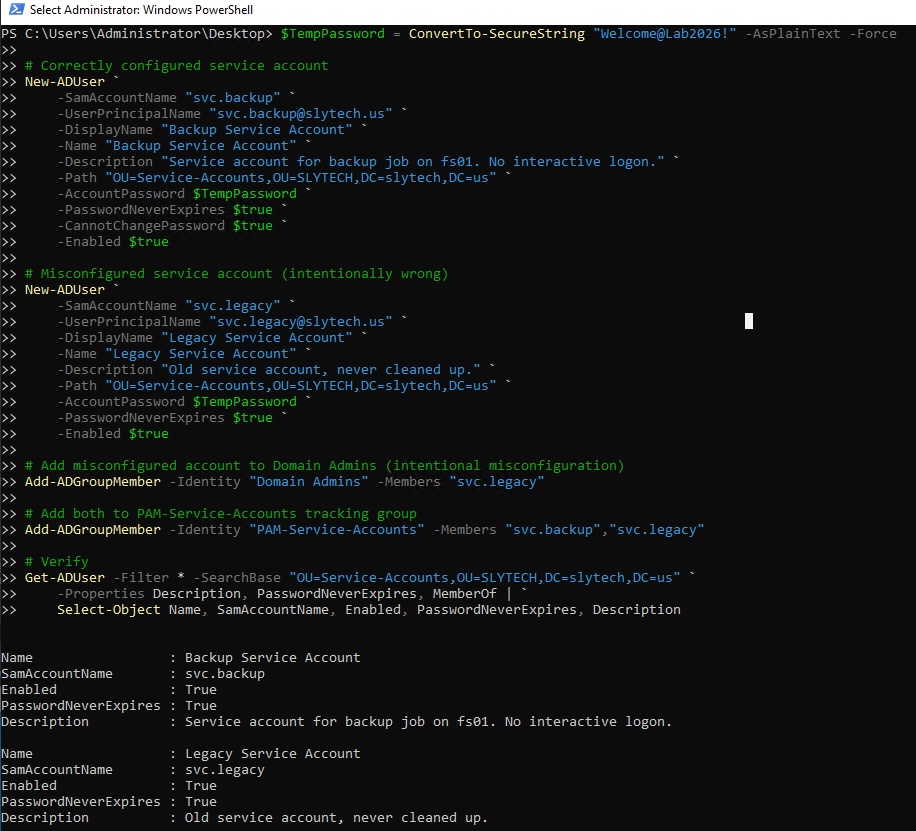
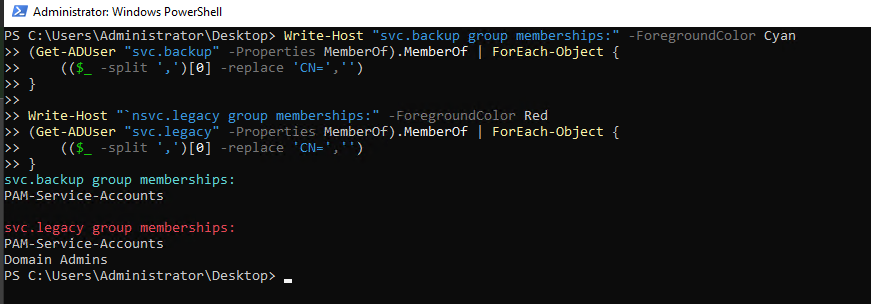
The group membership comparison is the clearest way to see the problem. svc.backup has one group. svc.legacy has two, and one of them is Domain Admins. If an attacker gets the credentials for that service account, they own the domain.
Scenario 5: Privilege escalation detection
The final scenario simulates what an attacker does after gaining a foothold: escalate to Domain Admins. One command, standard user added to the most privileged group in the domain.
Add-ADGroupMember -Identity "Domain Admins" -Members "mwebb"
Windows logs this immediately as Event ID 4728, a member was added to a security-enabled global group. The Security event log on dc01:
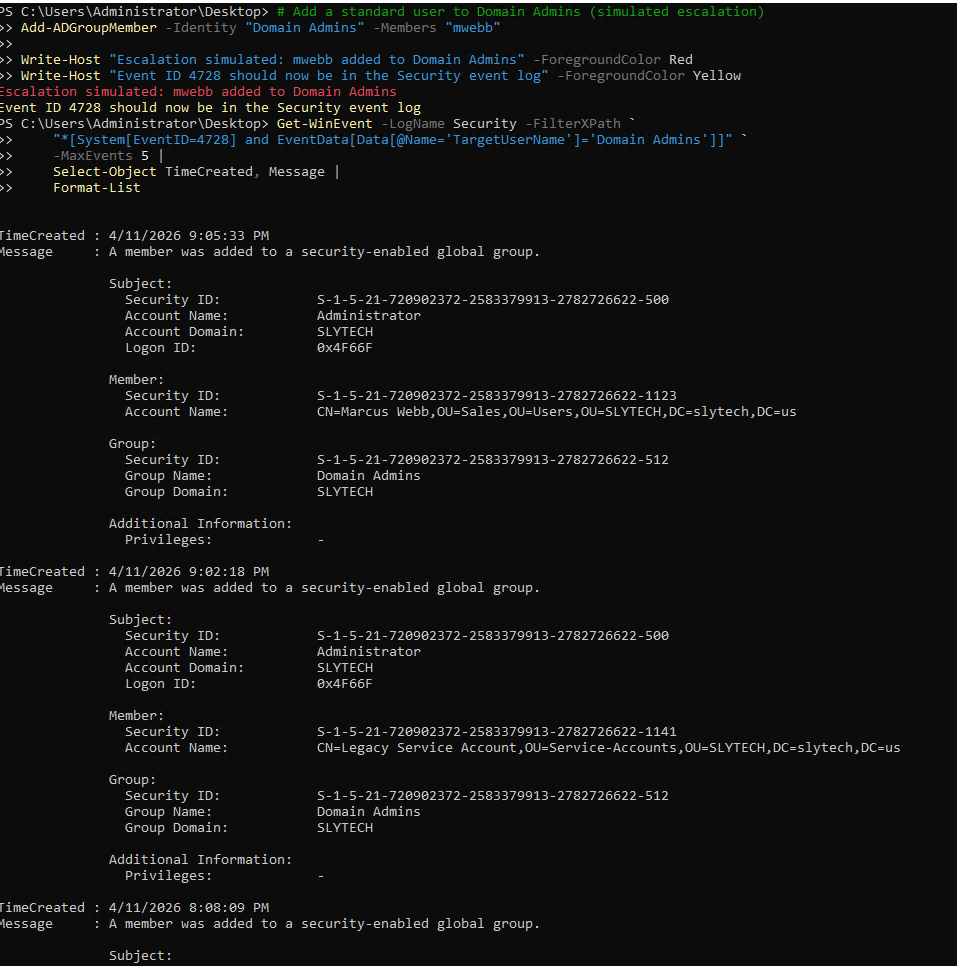
The event contains everything a SOC analyst needs: the timestamp, the account that performed the action (Administrator in this case, but in a real attack it would be the compromised account), the member that was added, and the group it was added to. Pulling this in Wazuh or Splunk gives you an alert the moment it happens.
The log output from this lab session actually showed four separate 4728 events because every Domain Admins change during the build got recorded: the two legitimate Tier 0 assignments, the svc.legacy misconfiguration, and the simulated escalation. That’s the value of auditing this event continuously. You see every change, legitimate or not, and you can trace the full history.
What a SOC analyst does with this alert:
- Identify the account that was added: is it a known admin account following the naming convention?
- Identify who made the change: is the Subject account authorized to modify Domain Admins?
- Check for a corresponding ticket or JIT elevation request
- If no ticket exists, treat it as unauthorized and begin incident response
- Immediate action: remove the account from Domain Admins, disable if compromised, preserve logs
The remediation in this lab took one command:
Remove-ADGroupMember -Identity "Domain Admins" -Members "mwebb" -Confirm:$false
In production you’d also force a password reset on any account that touched the change, review other recent changes by the same actor, and pull a full timeline from your SIEM.
Wrapping up
All scripts for this lab are published at github.com/SlyCyberLab/PAMLab. The repo includes the JIT elevation script, the privileged account audit script, and the GPO reports for all three tier restriction policies.
PAM is one of those disciplines that looks like overhead until you need it. The tiered model, the JIT workflow, the audit script, none of it is complicated to implement. What’s complicated is doing it consistently, documenting it properly, and actually running the audit on a schedule instead of only when something breaks. This lab makes all of that concrete and reproducible.